7.13 Example — Doublet Lens Cylinder
PDF section 7.13. Source script: KrakenOS/Examples/Examp_Doublet_Lens_Cylinder.py.
Sets Cylinder_Rxy_Ratio = 0 on the rear face of the doublet to turn it
into a cylindrical surface, plus a TiltZ rotation to roll the cylinder
axis. Viewing the system along X versus Y shows that the surface is plane
on one axis and curved on the other.
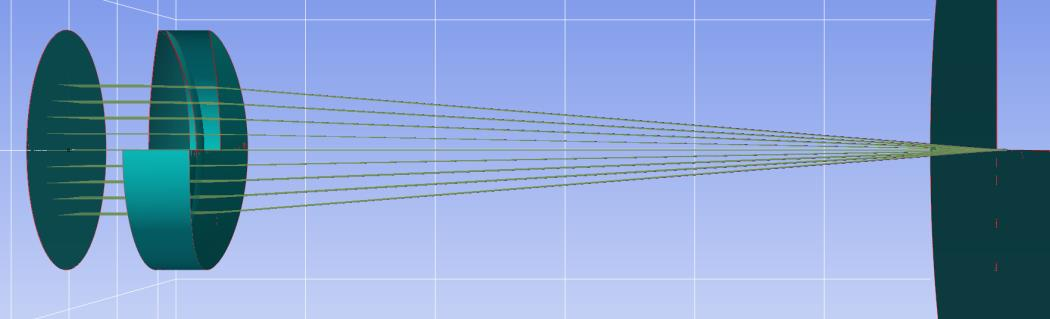
Figure 20a. View along the X axis — the cylindrical face is plane.
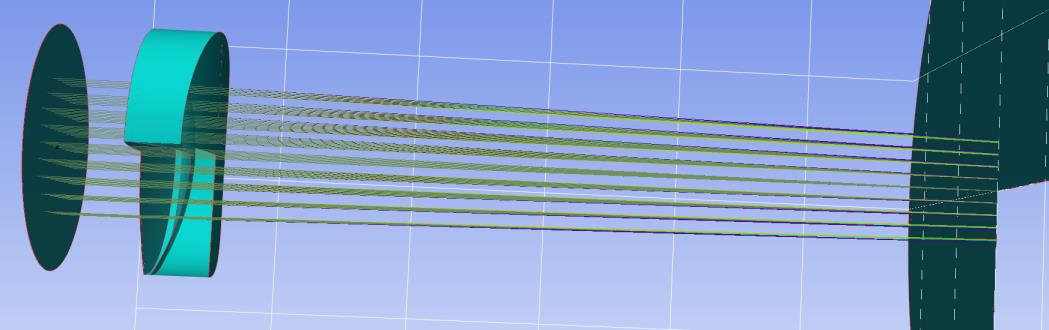
Figure 20b. View along the Y axis — the cylindrical face shows curvature.
#!/usr/bin/env python3
# -*- coding: utf-8 -*-
"""Examp Doublet Lens Cylinder"""

import numpy as np
from importlib import metadata
""" Looking for if KrakenOS is installed, if not, it assumes that
an folder downloaded from github is run"""

required = {'KrakenOS'}
installed = {dist.metadata["Name"] for dist in metadata.distributions() if dist.metadata.get("Name")}
missing = {pkg for pkg in required if pkg not in installed}

if missing:
    print("Not installed")
    import sys
    sys.path.append("../..")


import KrakenOS as Kos
# _________________________________________#

P_Obj = Kos.surf()
P_Obj.Rc = 0.0
P_Obj.Thickness = 10
P_Obj.Glass = "AIR"
P_Obj.Diameter = 30.0

# _________________________________________#

L1a = Kos.surf()
L1a.Rc = 9.284706570002484E+001
L1a.Thickness = 6.0
L1a.Glass = "BK7"
L1a.Diameter = 30.0

# _________________________________________#

L1b = Kos.surf()
L1b.Rc = -3.071608670000159E+001
L1b.Thickness = 3.0
L1b.Glass = "F2"
L1b.Diameter = 30
L1b.TiltZ = 30
L1b.AxisMove = 0

# _________________________________________#

L1c = Kos.surf()
L1c.Rc = -7.819730726078505E+001
L1c.Thickness = 9.737604742910693E+001
L1c.Glass = "AIR"
L1c.Diameter = 30
L1c.Cylinder_Rxy_Ratio = 0
L1c.TiltZ = 90
L1c.AxisMove = 0

# _________________________________________#

P_Ima = Kos.surf()
P_Ima.Rc = 0.0
P_Ima.Thickness = 0.0
P_Ima.Glass = "AIR"
P_Ima.Diameter = 10.0

# _________________________________________#

A = [P_Obj, L1a, L1b, L1c, P_Ima]
configuracion_1 = Kos.Setup()

# _________________________________________#

Doblete = Kos.system(A, configuracion_1)
Rayos = Kos.raykeeper(Doblete)

# _________________________________________#

tam = 5
rad = 10.0
tsis = len(A) - 1
for i in range(-tam, tam + 1):
    for j in range(-tam, tam + 1):
        x_0 = (i / tam) * rad
        y_0 = (j / tam) * rad
        r = np.sqrt((x_0 * x_0) + (y_0 * y_0))
        if r < rad:
            tet = 0.0
            pSource_0 = [x_0, y_0, 0.0]
            dCos = [0.0, np.sin(np.deg2rad(tet)), np.cos(np.deg2rad(tet))]
            W = 0.4
            Doblete.Trace(pSource_0, dCos, W)
            Rayos.push()
            W = 0.5
            Doblete.Trace(pSource_0, dCos, W)
            Rayos.push()
            W = 0.6
            Doblete.Trace(pSource_0, dCos, W)
            Rayos.push()

# _________________________________________#

Kos.display2d(Doblete, Rayos, 0)
Kos.display2d(Doblete, Rayos, 1)