Case Study 17: Cooke Triplet Optimization From A Bad Start
Goal
This case study ports the useful workflow from Optiland
Tutorial_5c_Optimization_Case_Study.ipynb into a KrakenOS UI sequence. It
starts from a deliberately poor air-spaced Cooke triplet, analyzes the bad
spot/MTF result, exposes the variables in the editable table, and applies a
known optimized prescription so the before/after result is deterministic for a
presentation.
The screenshots in this tutorial are generated from the live Tk UI with:
python -m KrakenOS.UI.capture_cooke_triplet_case_study_screenshots
The physics validator is:
python -m KrakenOS.UI.validate_cooke_triplet_case_study
Load The Poor Triplet
Start the UI with
python -m KrakenOS.UI.layout_editor.In the top menu, choose
Layouts -> Starter Lenses -> Cooke Triplet Optimization Case Study.Confirm the analysis controls:
Object Mode = Infinity;Aperture = EPD;EPD = 4 mm;Field Type = Angle;Field Value = 3 deg;Field Count = 2;Wavelength = 0.55 um.
The starting prescription intentionally uses very weak +/-1000 mm radii.
It has the right positive-negative-positive Cooke topology, but it is not a
useful image-forming lens yet.
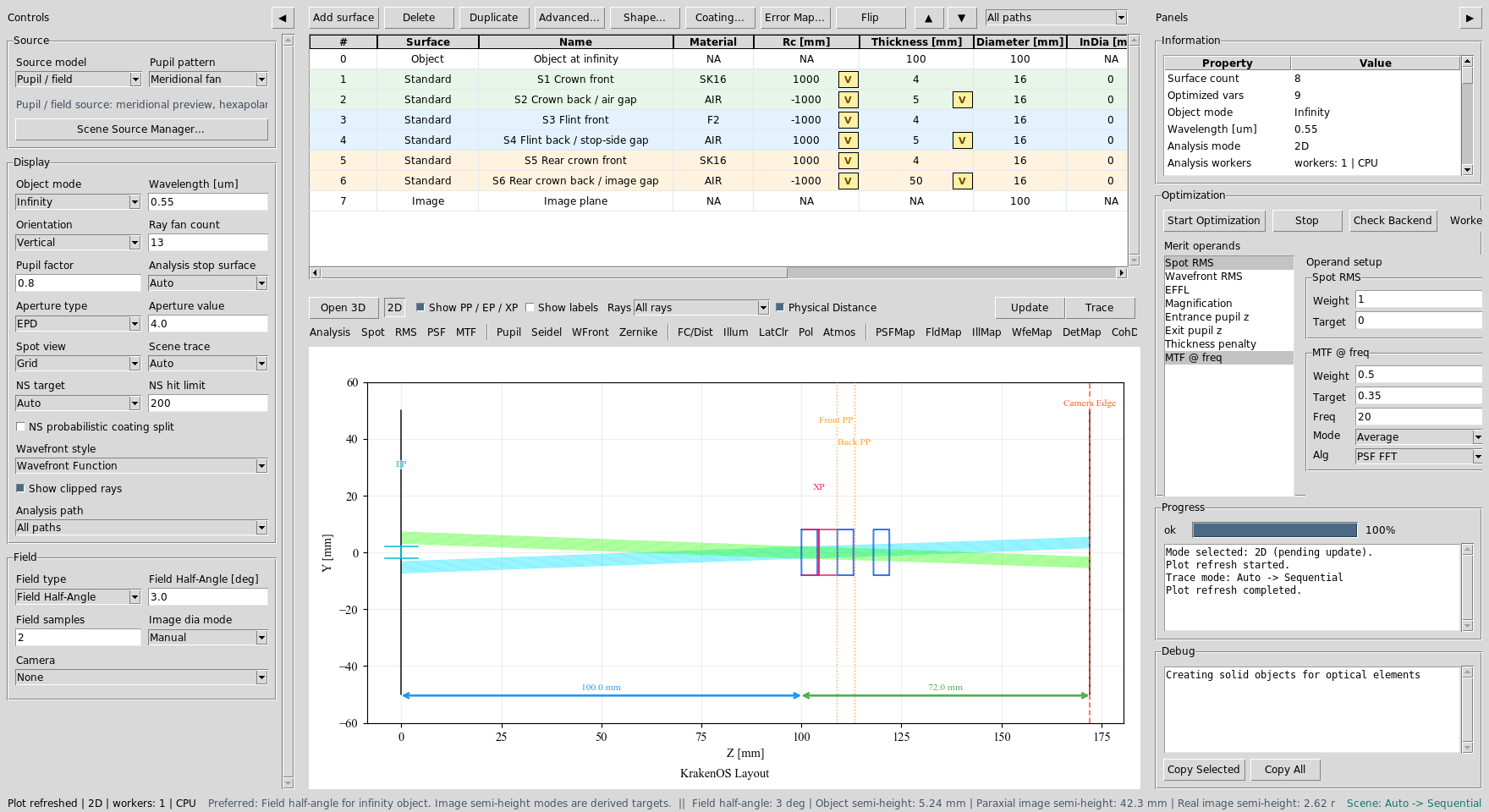
The starting Cooke-like triplet is loaded with radius and air-gap variables already marked in the table.
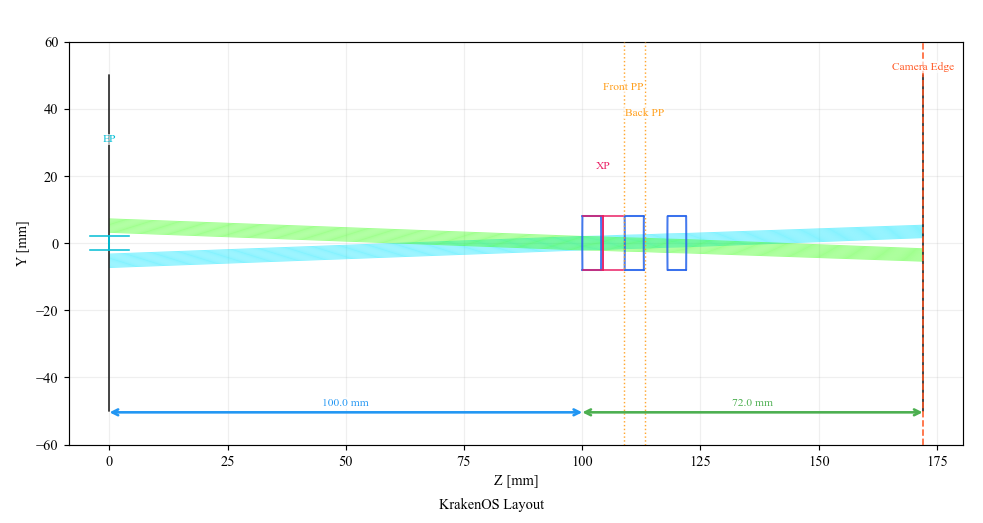
The layout has three air-spaced elements, but the surfaces are nearly flat.
Make The Bad Analysis
Click Spot and Update. The primary-wavelength spot is intentionally
large. The validator checks that the starting point has more than 1 mm RMS
spot radius both on-axis and at 3 deg.
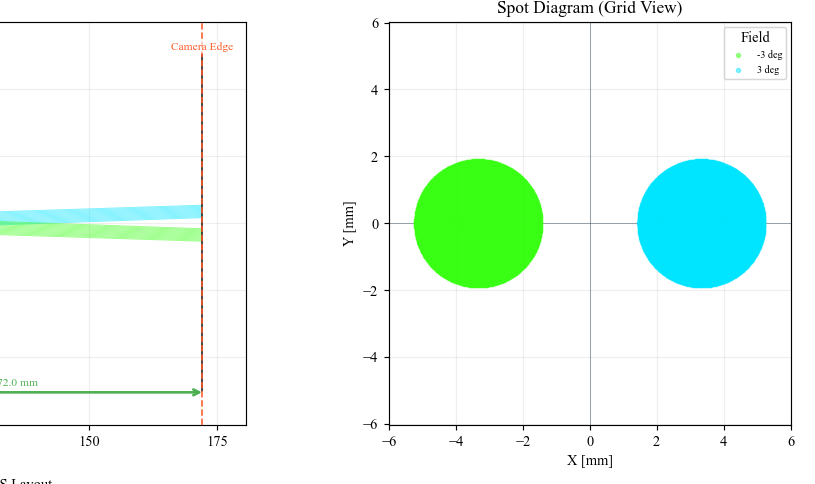
Starting Spot AOI: the nearly-flat prescription does not focus the EPD bundle.
Click MTF and Update. Use MTF @ freq = 20 cycles/mm with
Alg = PSF FFT in the Optimization panel. The starting geometric MTF at
this frequency is nearly zero because the image blur is too large.
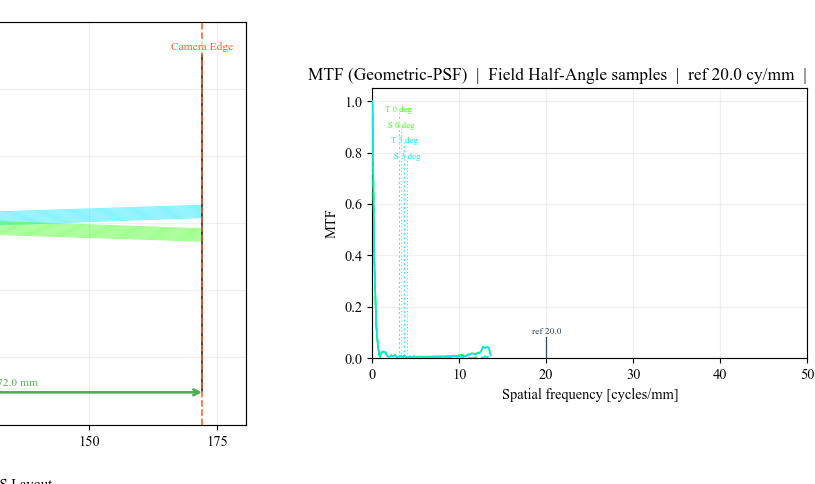
Starting MTF AOI: the poor prescription has little useful contrast at the reference spatial frequency.
Understand The Variables
The starting layout marks six radii and three air gaps for optimization:
Row |
Variable |
Bounds |
Why it matters |
|---|---|---|---|
S1 |
Radius |
|
Front crown power. |
S2 |
Radius and air gap |
|
Back crown power and spacing to the flint. |
S3 |
Radius |
|
Front flint negative power. |
S4 |
Radius and air gap |
|
Back flint power and stop-side spacing. |
S5 |
Radius |
|
Rear crown front power. |
S6 |
Radius and image gap |
|
Rear crown back power and focus distance. |
This is a true lens-design problem, not only a focus solve. The machine-vision case study changes one sensor distance. This Cooke case changes the optical prescription itself.
Apply The Optimized Prescription
For a live demo, use this deterministic prescription instead of relying on a
long stochastic optimizer run. Enter these values in the table, or use the
layout’s OPTIMIZED_SURFACES data as shown in
KrakenOS/Examples/Examp_Cooke_Triplet_Optimization_Case_Study.py.
Row |
Radius mm |
Thickness mm |
Glass after surface |
|---|---|---|---|
S1 Crown front |
|
|
|
S2 Crown back / air gap |
|
|
|
S3 Flint front |
|
|
|
S4 Flint back / stop-side gap |
|
|
|
S5 Rear crown front |
|
|
|
S6 Rear crown back / image gap |
|
|
|
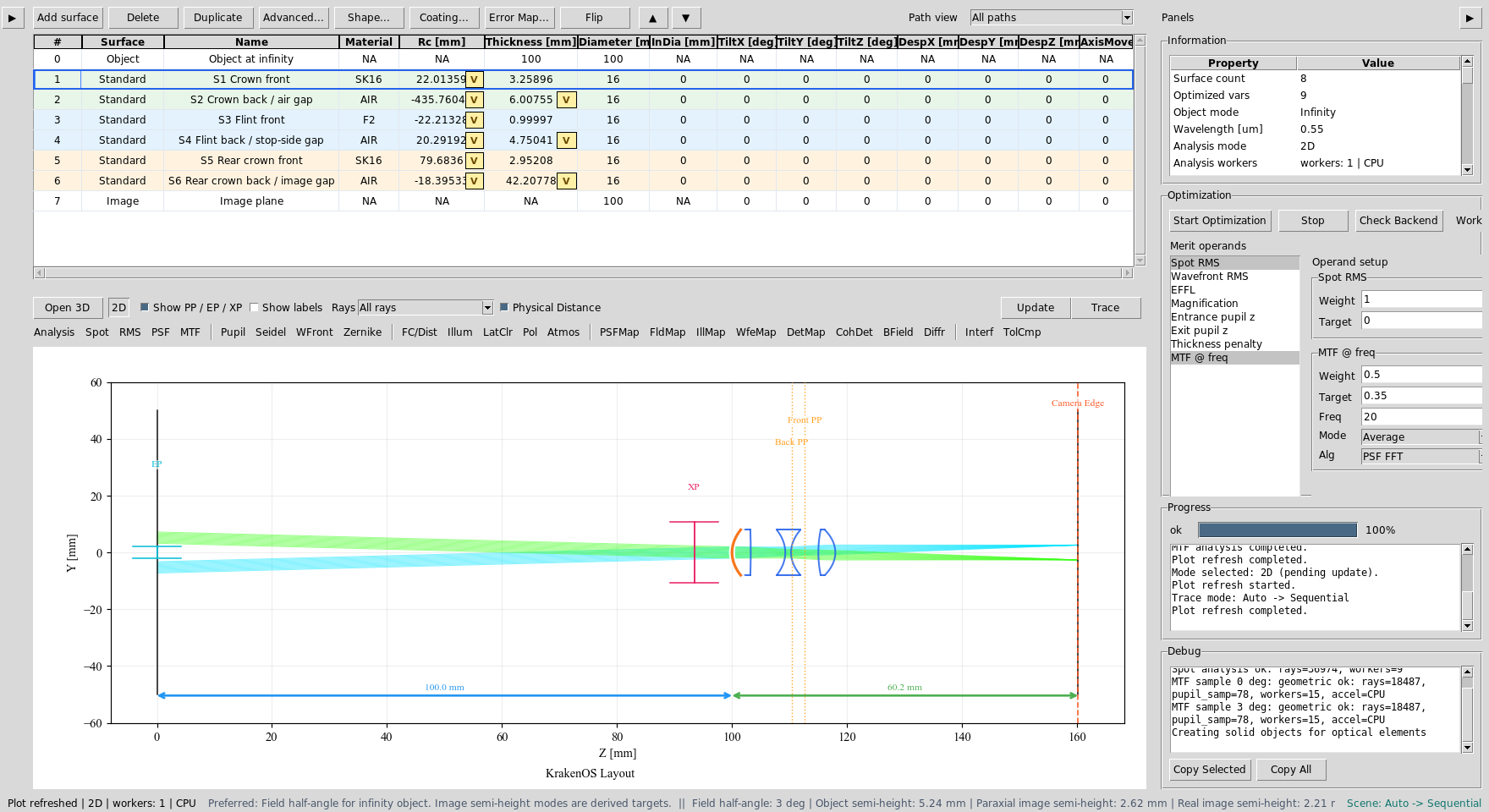
The final prescription is still the same three-element Cooke topology, but the radii and spacings now carry real optical power.
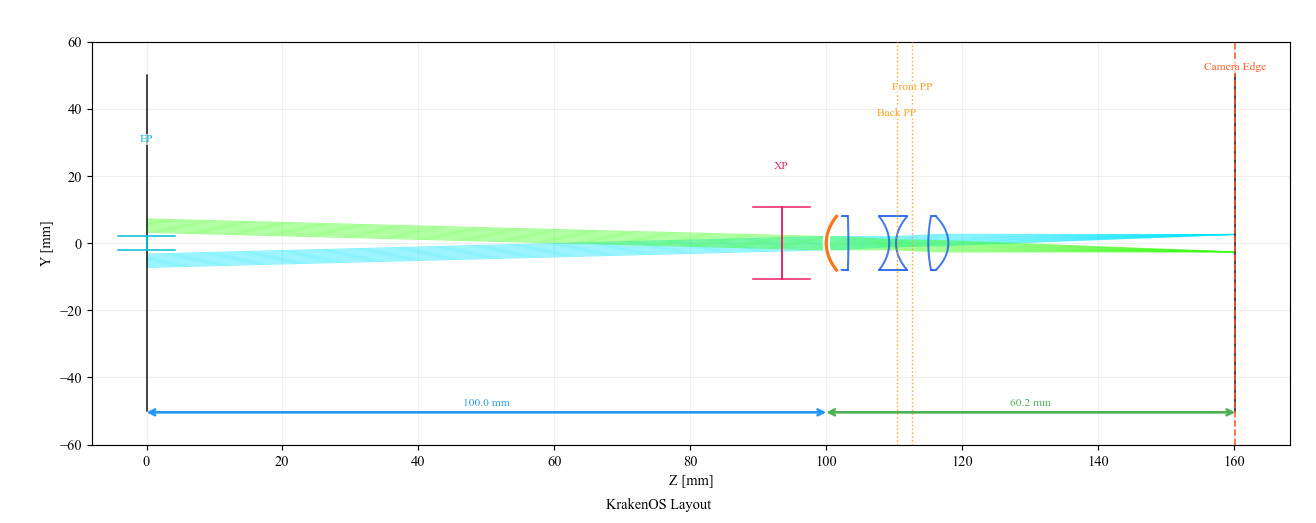
Optimized layout: the primary-wavelength rays now come to focus near the Image row.
Verify The Improvement
Click Spot and Update again. At 0.55 um, the validator checks that
the optimized RMS spot is below 0.01 mm both on axis and at
3 deg.
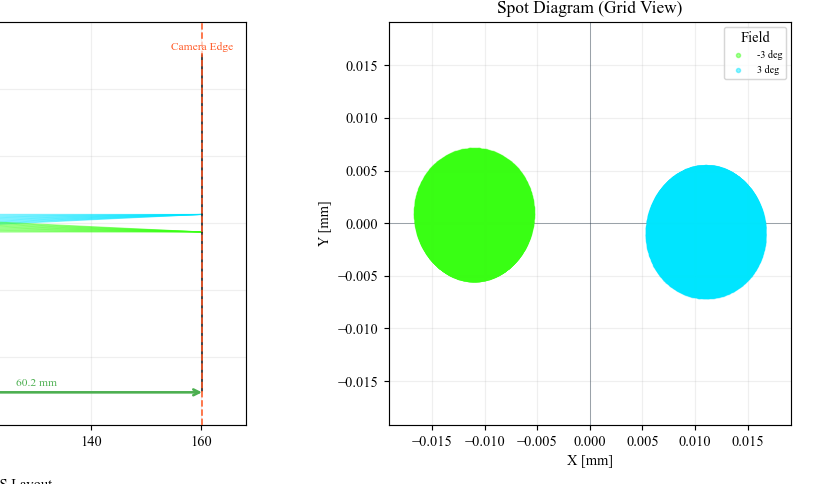
Optimized Spot AOI: the primary-wavelength spot collapses by more than
50x in mean RMS radius.
Click MTF and Update. At 20 cycles/mm the optimized primary
prescription recovers useful geometric MTF, while the starting layout was
nearly zero.
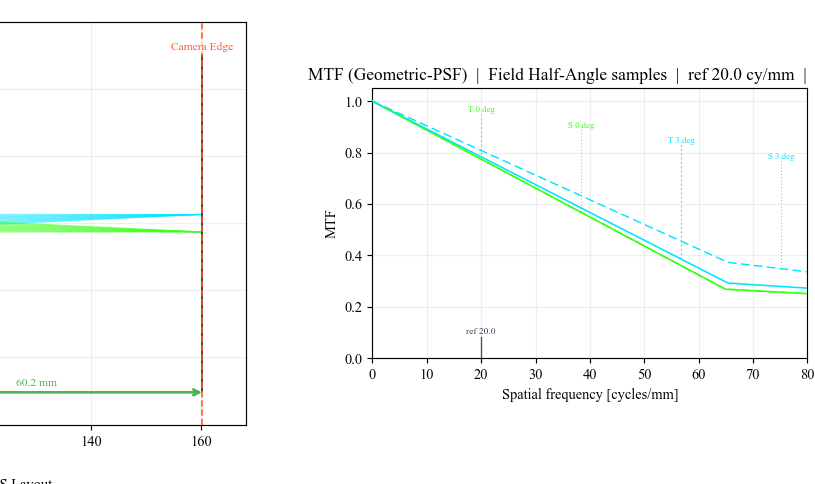
Optimized MTF AOI: the same analysis panel now shows usable contrast.
What This Proves
This case study exercises a sequential lens-design workflow:
air-spaced multi-element prescription editing;
real glass choices from the KrakenOS material catalog;
six radii and three air gaps exposed as optimization variables;
Spot and MTF analysis on a poor first design;
deterministic optimized prescription entry;
validator-checked primary-wavelength spot improvement.
Common Mistakes
I typed angle as lowercase angle.Use the UI control value
Angle. The KrakenOS UI maps that value to the correct field generator for off-axis rays.I expected all three wavelengths to match Optiland exactly.This case study validates the primary wavelength. The imported Optiland-style prescription is a teaching endpoint, not a released achromat tolerance file.
The optical diameters look generous.They are deliberately generous in this teaching layout so the off-axis field analysis is about lens power and spacing, not mechanical vignetting.