Tracing And Ray Data
Scene-first UI model
The UI is moving toward a non-sequential scene-first architecture. The editable table is treated as a KrakenOS scene/object list. Exact sequential tracing is still first-class, but it is the axial ordered-surface special case of that scene model rather than the UI’s long-term organizing principle.
The Scene trace control therefore behaves as follows:
Autouses KrakenOSNsTraceLoopwhen the layout contains a physical source, a beam splitter, an STL optical solid, off-axis/tilted scene geometry, a non-sequential target surface, or probabilistic non-sequential coating.Non-Sequential Previewexplicitly forces the scene trace path.Sequentialexplicitly forces the ordered-surface axial compatibility path.Folded Previewremains a legacy display compatibility mode for simple mirror-folded layouts.
The separate Folded reach control decides whether folded 2D display paths
are allowed to define detector hits:
Trace eventskeeps KrakenOS ray events authoritative. Folded display detector status, residuals, and detector surface are still written to Ray Events CSV and ray-analysis records, but they do not replace the physical terminal surface or detector-hit flag.Display compatibilitypreserves the old folded-preview behavior for layouts that intentionally use a display path as the detector reach model. This mode is explicit because it is a compatibility display workflow, not a physical non-sequential trace.
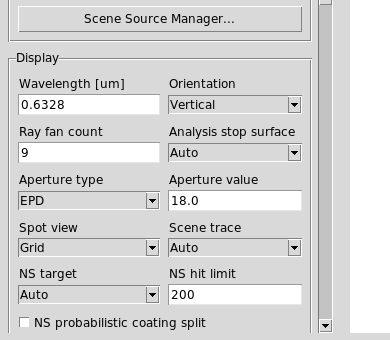
Scene trace lives in the left Display controls beside the ray count,
aperture, non-sequential target, and hit-limit fields.
2D slices, 3D scenes, and CAD envelopes
The UI keeps ray generation 3D-first for scene/CAD workflows:
The 2D layout is a display slice/projection.
YZandXZare physical section views through the traced 3D bundle;XYis the top-view footprint. In a section view a finite-object cone appears as a triangular slice rather than a filled cone.Sequential
Pupil / field2D previews use one shared 3D section trace and filter it into the selected projection. If the active field span is zero, the UI disablesField SamplesasNAand traces one effective on-axis field launch while preserving the requested field count in metadata.Pupil / fieldsource cones keep their source intent when a STEP overlay is promoted into a non-sequential scene. A nonzero source cone remains a filled 3D point-cone launch, and a collimated source remains a collimated bundle, rather than silently switching to an aperture-envelope sampler or a meridional fan slice after face assignment. Explicit world-envelope sampling is still available for diagnostic/export workflows that need an object or pupil boundary envelope.Ray hover/click diagnostics in the 2D plot and 3D viewers read the canonical terminal event. A missed detector/Image reports the detector surface, plane distance, radial miss, active half-aperture, local detector-plane X/Y, active detector width/height, and the original kernel terminal reason when available.
Active detector footprints and missed-detector crosshairs are scene-target overlays, not viewer-only guesses. The 2D projector and both 3D viewers draw them from
SceneTarget3Ddetector metadata and ray terminal events.The 3D inspector is not produced by revolving the 2D sketch. It retraces a source-driven 3D boundary bundle around the entrance pupil/object cone, then adapts inward to the through-going pupil envelope if the outer launch boundary is clipped by the optical train. The 3D
Full Pupiltoggle still requests a dense full-pupil bundle.Export 3D STEPuses the same source-driven 3D boundary bundle and then writes only the outer ray envelope as solid STEP tubes for mechanical review.
This separation matters for arbitrary shapes: STL/STEP solids, prisms, beam splitters, and future non-sequential components must see true world-coordinate ray directions, while the 2D view remains a readable diagnostic slice.
Sequential tracing special case
The manual’s basic workflow is:
Build
surfobjects for Object, optical surfaces, stops, mirrors, and Image.Create
config = Kos.Setup().Create
system = Kos.system(surface_list, config).Trace rays with
system.Trace(source_point, direction_cosines, wavelength).Push traced rays into
Kos.raykeeper(system).
Minimal example:
import KrakenOS as Kos

obj = Kos.surf()
obj.Thickness = 100.0
obj.Glass = "AIR"
obj.Diameter = 30.0

lens = Kos.surf()
lens.Rc = 92.847
lens.Thickness = 6.0
lens.Glass = "BK7"
lens.Diameter = 30.0

image = Kos.surf()
image.Glass = "AIR"
image.Diameter = 20.0

system = Kos.system([obj, lens, image], Kos.Setup())
rays = Kos.raykeeper(system)
system.Trace([0.0, 0.0, 0.0], [0.0, 0.0, 1.0], 0.55)
rays.push()
Non-sequential tracing
The manual introduces system.NsTrace(source_point, direction_cosines,
wavelength). Current UI coverage adds:
Autoscene tracing that resolves toNsTraceLoopfor source-driven, beam-splitter, off-axis, target-surface, or coating-probability scenesexplicit Non-Sequential Preview mode
NsLimittarget surface selection using
TargSurf/TargSurfRestenergy_probabilityfor probabilistic coating branch splittingBeam Splitterrows that persist splitter settings, spawn deterministic reflected/transmitted child paths, and write coating tables as a fallbackfile-backed optical CAD/STL solids through native
Solid_3d_stlrows; unsupported STEP/IGES vendor CAD is meshed to cached STL, and closed meshes use the row material for non-sequential entry/exit regardless of the tilted mesh side selected by the hit choosersupported axisymmetric optical STEP lenses can be rebuilt as KrakenOS-native analytic surface rows for transient Open 3D Show Rays/Trace Now previews and for explicit native-row promotion, avoiding faceted STL normals for refractive lens physics
Non-Sequential Scene Graph inspection and CSV export
Trace Path inspection and CSV export
Branches are produced by KrakenOS during NsTrace/NsTraceLoop. They are
not hand-authored nodes; the UI shows them as trace diagnostics after the ray
trace. Deterministic beam-splitter mode records branch identity, parent
identity, power, phase metadata, and branch labels in raykeeper.
Scene source records
The UI maps the current Source panel to a first-class SceneSource3D record
when no explicit scene sources are defined. For multi-source work, use
Actions -> Scene Source Manager... or the Scene Source Manager... button
in the Source panel. The manager edits the saved SETTINGS["scene_sources"]
records, controls whether source rows appear after Object or before Object, and
keeps those source rows separate from KrakenOS surf indices. Saved layouts
can also declare the same records directly, for example:
SETTINGS = {
    "scene_sources": [
        {
            "source_id": "source:left",
            "name": "Left illuminator",
            "model": "Collimated disk source",
            "origin": [0.0, -10.0, 0.0],
            "direction": [0.0, 0.124, 0.992],
            "radius": 1.2,
            "ray_count": 5,
            "power": 0.6,
        },
        {
            "source_id": "source:right",
            "name": "Right illuminator",
            "model": "Collimated disk source",
            "origin": [0.0, 10.0, 0.0],
            "direction": [0.0, -0.124, 0.992],
            "radius": 1.2,
            "ray_count": 5,
            "power": 0.4,
        },
    ],
}
The source record is carried by SceneBundle.sources and exposed in the
Non-Sequential Scene Graph. Physical source modes such as Collimated disk
source and Gaussian beam are marked as illumination sources. The legacy
Pupil / field source mode is marked as a pupil_field_reference because
it is not a physical emitter independent of the Object row.
Use Actions -> Source Illumination Report after Update to audit a
selected Object, aperture, splitter, detector, or Image surface. The report
groups traced hits by SOURCE_ID and shows launched source rays, target-hit
rays, missed/vignetted rays, hit power, power throughput, hit centroid, RMS
radius, and hit span. For rays that never hit the selected target, the report
also shows missed power, the dominant terminal/loss surface, and a terminal
count breakdown. The report table stays compact; selecting a source row opens
the full loss, power, centroid, RMS, and span details in the details pane below
the table. The exported CSV includes those same loss-diagnostic fields.
The Illum analysis button uses the same traced records for layouts with
explicit scene sources and plots a target-surface power-density map with
per-source centroids; when target rays are missed, the plot annotation includes
the dominant loss terminal. This source-to-object diagnostic layer uses the same
traced 3D ray data as Ray Inspector and SceneBundle, so it does not rebuild a
separate illumination ray set.
For physical scene sources, Illum is normally a camera-sensor or Image-plane
relative illumination plot. With target Auto, the UI therefore chooses the
first traced-hit target by optical-design priority: Detector/Image, Object or
Diffuse Object target, Aperture/Stop pupil plane, then any other hit surface.
Use Analysis surface or the Source Illumination Report Target dropdown
to override that default when you intentionally want illumination on an entrance
pupil, aperture stop, exit pupil proxy, object target, or intermediate surface.
The table row selection alone is not used as the Illum target, which avoids
accidentally plotting illumination on a beam splitter or lens row.
Launch sampling metadata
Ray exports preserve both what the user requested and what the physical launch
actually contains. This matters most for on-axis sequential layouts: a saved
layout may request three field samples, but if Field Half-Angle or object
height is zero, all three fields overlap. The live preview traces one effective
field launch; saved rays and CSV exports record both values so the browser view
does not hide either fact.
The launch metadata appears on raykeeper arrays, canonical RayEvent3D
records, Ray Inspector rows, ray-analysis rows, and ray-event CSV exports:
LAUNCH_FIELD_REQUESTED: authored field sample count.LAUNCH_FIELD_EFFECTIVE: distinct physical field launches after overlap collapse.LAUNCH_FIELD_BASISandLAUNCH_FIELD_UNIT: angle/object-height basis.LAUNCH_FIELD_MINandLAUNCH_FIELD_MAX: sampled field span.LAUNCH_FIELD_ACTIVE: false when the span is zero.LAUNCH_RAY_COUNTandLAUNCH_PUPIL_PATTERN: per-launch ray sampling.LAUNCH_TRACE_INTENTandLAUNCH_SAMPLING_MODE: resolved sequential or non-sequential path plus UI/saved sampling mode.
Missed detector terminals are also event-owned. Image rows are detector
terminals in both sequential and non-sequential scene mode. If a
non-sequential ray exits the modeled optical geometry before reaching a
detector/Image surface, the scene event layer projects that terminal marker to
the detector plane. It is classified as
missed_image/missed_detector and remains reaches_detector=False.
Ray-event and ray-analysis CSV rows preserve
terminal_geometry_source=detector_miss_plane plus detector surface,
projected distance, radial miss, active half-aperture, plane-normal residual,
and the original kernel terminal reason. The 2D and Open 3D viewers use the
same terminal status: detector hits, missed detectors, absorbed paths, escaped
paths, and diagnostic stops remain distinct. Dense 2D plots continue to show
non-hit terminal markers even when normal detector-hit glyphs are hidden. The
2D projector and Open 3D cap escaped display tails before autoscale/rendering,
and Open 3D keeps missed-detector diagnostics on the detector plane while
suppressing escaped/missed endpoint spheres, so a display-only clipped tail is
not confused with a physical absorbing surface.
The Show clipped rays control is shared between the two viewers. In the 2D
editor it is the Show clipped rays checkbox; in the Open 3D viewer it is the
Clipped entry in the Overlays menu. Both bind the same setting, so toggling
it in either view updates the other, and both views now apply the same filter:
turning it off keeps the rays that reach the detector plus any deliberately
folded branch (a beam-splitter’s reflected second path), while every non-folded
stray is hidden – escaped rays, vignetted/stopped paths, detector misses,
and absorbed rays alike (for example an illumination fan that misses the lens
entirely). A fold is a real branch the user authored, so it survives the filter
regardless of where it terminates. If hiding clipped rays would blank every
ray, the viewer keeps the trace drawn so the beam never silently disappears. The
Open 3D Overlays menu’s separate Miss entry is unrelated to ray-line
visibility – it only toggles the terminal-endpoint diagnostic markers
(detector-miss crosshairs and endpoint disks).
Selected-ray display labels are event-owned as well. The 2D projector preserves
mesh_face_id, surface_name, and interaction model fields when canonical
RayEvent3D records are projected into ProjectedRayEvent2D markers. The
2D plot and embedded Open 3D viewer then format the selected path from the same
record, using compact labels such as F003 Reflect, F006 Transmit, and
F007 Miss. This makes a wrong-looking segment debuggable without guessing
from color or projection alone: the visible label names the face and the event
law that the trace actually applied.
Actions -> Detector Aperture Report summarizes those same ray-analysis
records by detector/Image surface. It reports ray/path count, unique source-ray
count, detector hits, missed-detector projections, stopped/other terminals, hit
and miss power, hit/miss fractions, the worst miss margin, worst local X/Y, and
the dominant terminal reason. Its CSV export keeps the detector surface plus
the worst-miss radial, active half-aperture, projected distance, and plane
normal residual fields, so aperture clipping can be audited without reading the
2D plot by eye. The same aggregate detector hit/miss counts are written into
the normal results panel after each trace, and the status bar reports a compact
detector-miss warning when any detector/Image aperture is clipped. Ray
Inspector top rows and CSV export also include normalized per-ray aperture
status fields so each path can be read as detector hit, detector miss, detector
bypass, or unrelated to a detector.
The editable table still stores KrakenOS optical surfaces. A visible
Illumination Source table entry is a scene row backed by SceneSource3D,
not a KrakenOS surf row. Double-click a source row to open the Scene Source
Manager. Right-click the source row for direct source-row actions such as
duplicate, delete, and move up/down; those actions update
SETTINGS["scene_sources"] only and do not insert pseudo-surfaces. That
distinction keeps source authoring from shifting detector/path surface indices.
Scene target records
The scene bundle also carries SceneTarget3D records. These records make
Object, Object Target, Diffuse Object, Aperture, Image/detector, and explicitly
selected non-sequential target rows visible as object/detector scene entities
without adding or reordering KrakenOS surf indices. Object and Image rows
remain reference/detector targets by default; they do not become movable
ScenePlacement3D handle records, and old placement metadata on those
reference rows is ignored by the 3D handle layer.
Each target record stores:
row index and trace-surface index;
target role, such as
object_reference,object_target,aperture,detector, oranalysis_target;world center, normal, and tangent vectors used by display/analysis tooling;
detector active area, detector bins, and pixel pitch when detector metadata is present;
whether the record is a detector, an object/reference, or the active
TargSurfselection.
Actions -> Non-Sequential Scene Graph exposes these records under
Scene targets. Use Edit Target in that window to update target identity
without creating a UI-only abstraction. The editor stores target role metadata
on the surface row, writes detector active area/bins/pixel pitch through the
same detector metadata used by detector analyses, and can set or clear the
active non-sequential TargSurf selection.
Choosing Detector marks the selected non-Object row as a detector target.
Choosing Object Target, Diffuse Object, or Aperture applies the
same surface-type defaults used by the editable table, so KrakenOS tracing
still receives ordinary prescription rows. Choosing Analysis Target keeps
the surface type unchanged but persists a scene-target role for diagnostics and
future target-aware analysis.
Possible next scene workflows
White-light triangular-prism dispersion is compatible with the North Star. It should be implemented as a wavelength-sampled physical source, not a 2D color overlay. The trace should launch the same beam over a wavelength list, let the glass catalog produce wavelength-dependent refractive indices, and store each ray’s wavelength in canonical events. The 2D and 3D renderers can then color the same traced rays by wavelength and a detector target can report the chromatic spot/rainbow footprint.
Direct placement of imported STEP optical components in the 3D plot is also
compatible with the current architecture. STEP/IGES already converts to cached
STL for tracing, and CAD/STL faces already carry placement and optical-role
metadata. Rows can now also carry ScenePlacement metadata for grid
visibility, linear snap spacing, angular snap step, and placement anchor
intent. SceneBundle exposes those records as ScenePlacement3D objects,
and the Non-Sequential Scene Graph exports them beside sources, targets,
volumes, and boundary faces. Open 3D reports the active snap/placement values in
a VTK overlay, but visible cube/grid planes are suppressed so they do not cover
CAD faces during assignment. The visible translation handles move the selected
row along global X/Y/Z by ScenePlacement snap spacing when snap is
enabled, or by the placement spacing when snap is off. Each move writes
DespX/Y/Z plus placement metadata through the normal row history/table path.
Arrowheaded rotation handles use one half-arc per global X/Y/Z axis with
opposed end arrows. For imported STEP overlays, the two end arrows are separate
+90 and -90 commands. Row placement handles apply a world-axis rotation
matching the visible ring,
by ScenePlacement.snap_deg when snap is enabled or by a coarse 15 degree
step when snap is off, and write TiltX/Y/Z through the same row
history/table path. Dragging a placement handle accumulates screen motion and
applies repeated snap steps through the same row-backed services; clicking
without dragging remains the precise one-step fallback. A full 3D placement
tool should still add richer face/axis picking, but those controls must persist
back to row pose plus ScenePlacement and optical-solid metadata. The same
scene state must drive the 2D projection, 3D display, tracing, scene graph
diagnostics, and CSV export.
Source orientation uses direction cosines L/M/N in global X/Y/Z axes.
In the usual YZ 2D layout, +Z is horizontal to the right and Y is
vertical on the page. Use the Source panel Direction preset dropdown for the
common cases:
Preset |
LMN |
Meaning in YZ layout |
|---|---|---|
|
|
Launch left-to-right along the optical table axis. |
|
|
Launch right-to-left. |
|
|
Launch upward on the YZ plot. |
|
|
Launch downward from a top port. |
The older Display orientation control only changes the 2D plot/view
orientation. It does not rotate a physical source.
SceneBundle.scene_row_mapping carries the bridge for that visible table. It
maps scene rows to current table rows and KrakenOS trace surfaces. For a reset
scene with one physical source, the default scene-row order is:
Scene row |
Kind |
Trace surface |
|---|---|---|
|
Surface |
|
|
Illumination source |
None |
|
Surface |
|
This lets the UI later show Object + Illumination Source + Image
without changing the trace indices consumed by raykeeper, detector paths, and
analysis tools.
Actions -> Non-Sequential Scene Graph exposes the same mapping today. The
tree has a Scene row order node and columns for scene row, current table
row, trace surface, and source ID. Use it to confirm whether a source is a
physical scene emitter or an optical surface before relying on detector/path
indices.
For illumination-first layouts, set scene_row_order="before_object" in
layout SETTINGS. The future scene-row order then becomes Src1 Source 1,
S0 Object, S1 Image while trace surfaces remain 0 and 1. This is
intended for source/object split systems where the user thinks of placing a
lamp or laser first, then the object, then imaging optics.
For source/object split fixtures that need a return path today, use the table
surface type Object Target. It is intentionally semantic: the UI presents it
as the object location, while the current tracing backend maps it to a specular
reflective proxy. This avoids labeling the object as a normal Mirror in the
workflow.
Use Diffuse Object when the object should scatter instead of returning one
specular proxy ray. Its DiffuseScatter metadata uses the built-in
Lambertian, Oren-Nayar, Cosine Lobe, or optional pySCATMECH backend: a hit
spawns deterministic child branches named scatterNN and records their
powers in BRANCH_POWER. For imaging
fixtures, set target_surface in that metadata to a pupil, lens, detector,
beam splitter return aperture, or Image surface; the core then
importance-samples that target with approximate model-weighted solid-angle
weights instead of wasting most rays outside the useful camera path.
For detector-plane coherence analysis, CohDet now supports grouping modes:
All rays coherent, By source ray, By source, and Incoherent power
only. By source ray is the practical default for interferometers and
source bundles because complementary branches from one launched source ray still
interfere, while independent launches add as intensities instead of one global
field.
The same detector-bin machinery now exposes branch-code self terms and
complementary branch-pair interference terms on the detector grid. Detector-
bearing interferometer layouts can therefore let Interf reuse the coherent
detector accumulation when the detector sampling is dense enough; sparse
single-ray presets still fall back to the analytic path-average diagnostic.
The Diffr analysis then takes the same coherent detector field and computes
a vector Fraunhofer/angular-spectrum FFT, with coherent groups handled
according to the selected coherence mode. The detector-bin stability validator
checks that changing the detector grid does not silently change the traced
sample set, branch-code set, coherence grouping, incoherent power accounting,
all-rays Jones-vector intensity, or unitary FFT power conservation.
Regression check:
python -m KrakenOS.UI.validate_object_target_surface
python -m KrakenOS.UI.validate_diffuse_object_scatter
python -m KrakenOS.UI.validate_diffuse_object_cosine_lobe
python -m KrakenOS.UI.validate_diffuse_object_oren_nayar
python -m KrakenOS.UI.validate_diffuse_object_pyscatmech
python -m KrakenOS.UI.validate_coherent_detector_modes
python -m KrakenOS.UI.validate_interferogram_detector_accumulation
python -m KrakenOS.UI.validate_diffraction_detector
python -m KrakenOS.UI.validate_detector_sampling_stability
python -m KrakenOS.UI.validate_detector_aperture_analysis
Each traced ray also carries source identity metadata:
SOURCE_ID: stable source key such assource:0orsource:leftSOURCE_NAME: user-facing source name such asSource 1orLeft illuminatorSOURCE_ROLE:illuminationorpupil_field_referenceSOURCE_MODEL,SOURCE_XYZ,SOURCE_LMN,SOURCE_POWER,SOURCE_WEIGHT, andSOURCE_WAVELENGTH: launch model and launch state
Validate this plumbing with:
python -m KrakenOS.UI.validate_scene_sources
python -m KrakenOS.UI.validate_multi_scene_sources
python -m KrakenOS.UI.validate_scene_row_mapping
python -m KrakenOS.UI.validate_scene_source_row_contract
python -m KrakenOS.UI.validate_gaussian_branch_frames
validate_scene_row_mapping also checks row-backed 3D placement state. The
coverage includes ScenePlacement snap/grid metadata, Open 3D translate and
rotate handle services, and the Snap Row->Target service that moves one row
or face onto another row or face while preserving the solved target-surface
constraint in row metadata. It also covers Orient Row->Target, which solves
row TiltX/Y/Z so a selected row or face normal aligns to another row or
face normal and stores the solved target-normal constraint in the same metadata.
The same validator now checks vector-backed orientation for Orient Row->Ray:
a selected row or face normal can be aligned to an arbitrary traced ray
direction, with the target vector, ray index, and residual angle error persisted
as ScenePlacement metadata. It also checks Orient Row->Source and
Orient Row->Path services, which persist source-vector and Path-frame
constraints, including source origin/direction, branch path, nearest target
point, and residual angle error. The validator also covers immediate local-axis
and explicit scene-source orientation: Orient Row->CAD Axis records the
selected row-local axis vector, and Orient Row->Scene Source records the
explicit source id/name, origin, direction, model, ray count, and residual
angle error. Named normal target coverage is included as well: the validator
checks Preview Normal for detector/object targets, verifies that preview
does not mutate row pose, and verifies that Orient Row->Normal records
detector_normal or object_normal metadata with target row/id/name/role,
target point, target normal, and residual angle error.
validate_layout_plot_controller also checks detector-miss terminal
projection so escaped rays that intersect the detector plane outside the active
aperture are displayed and exported as misses instead of arbitrary short
terminal segments. validate_scene_projection_terminal_bounds checks the
2D projection autoscale guard: escaped terminal tails are display-capped, and
missed-detector display points remain on the detector plane.
validate_selected_ray_event_labels checks that selected-ray labels preserve
mesh face identity through projected subsegments and use the same compact
face/action formatter for projected and canonical event records.
Optical STL prism check
For a prism STL rotated into the classic dispersion pose, the first STL hit
should not report n=1 -> 1. A BK7 prism entry should report approximately
n=1 -> 1.518 at 0.55 um and the outgoing direction should bend toward
the prism base. Run the regression check with:
python -m KrakenOS.UI.validate_stl_prism_media
Face-role metadata check
After changing the CAD/STL optical face workflow, run:
python -m KrakenOS.UI.validate_optical_solid_face_roles
This clusters the bundled prism STL into planar candidates, verifies automatic
input/output role assignment, checks that candidates expose triangle meshes for
3D click-picking, checks beam-splitter split-ratio persistence, and confirms
that saved OpticalSolidFaces metadata survives the advanced attribute
parser. It also verifies that assigned face roles transform into finite
unit-normal marker data for the CAD/STL placement preview and into the
triangle-indexed face records used by Open 3D outline overlays.
Face-anchor snap-to-ray check
After changing the CAD/STL placement workflow, run:
python -m KrakenOS.UI.validate_optical_solid_snap_to_ray
This validates the first Phase 7 prism/CAD improvement: when a file-backed
optical solid has saved face metadata, row-centering on a traced branch prefers
the best assigned optical-face anchor instead of the generic row origin. The
regression uses the bundled prism STL and checks that a designated transmitted
left face is selected and snapped onto the chosen axial ray. In Open 3D the
user-facing workflow is Center Row->Optical Axis so regular ray actors are
hidden during the target pick.
Face-fit placement check
After changing face-driven CAD/STL placement, run:
python -m KrakenOS.UI.validate_optical_solid_face_fit
This validates the next Phase 7 slice: the placement helper can choose a saved anchor face, align that face normal to the optical axis, center the anchor on the row plane, and apply a simple side-label-based roll constraint when a compatible guide face is available.
Path-frame face-fit check
After changing traced ray/path-driven CAD/STL placement, run:
python -m KrakenOS.UI.validate_optical_solid_path_fit
This validates the next placement step: the same face-fit solver can use the
currently selected traced ray or current Path-view frame as the target
direction and target point. The regression loads a traced beam-splitter layout,
attaches a controlled branch-ray bundle, solves a prism face onto that selected
ray, repeats the solve against the current Path dropdown frame, and verifies
that Save Roles stores row-relative decenter correctly when the CAD/STL row
is not at Z=0. It also covers the table workflow where a newly inserted
CAD/STL row is snapped to the outgoing traced segment of the previous table
surface instead of an earlier, merely closer ray segment.
Virtual internal plane check
After changing cube-style virtual internal optical-plane authoring, run:
python -m KrakenOS.UI.validate_optical_solid_virtual_plane
This validates the next CAD authoring slice: a labeled cube-like optical solid
can derive a saved internal beam-splitter diagonal, preserve it in
OpticalSolidFaces, and transform that plane into world coordinates for 3D
preview and placement.
Optical-solid hit-sequence check
After changing how traced CAD/STL hits map back onto assigned optical faces, run:
python -m KrakenOS.UI.validate_optical_solid_hit_sequence
This validates the next Phase 7 CAD authoring slice: traced hits on an optical
solid can be classified back to the saved face-role metadata, and crossings of
saved virtual internal planes can be inserted into the ordered hit sequence.
The regression uses a real traced prism STL chief ray and checks the expected
Left -> Right -> Down -> Left face sequence. It also compares the same hit
order against canonical ray-event records and scene graph boundary-face records
so closed-solid media state, runtime mesh face ids, TIR/refraction labels, and
face-role metadata stay synchronized. The same validator then adds a synthetic
cube-beam-splitter crossing to confirm the virtual splitter plane appears in
the correct position between the entry and exit faces.
Raykeeper data
The manual lists the raykeeper arrays as the persistent version of system
ray state. The UI Ray Inspector exposes the same categories:
Category |
Manual arrays |
UI data product |
|---|---|---|
Surface path |
|
Ray Inspector hit table and CSV. |
Coordinates |
|
Ray Inspector XYZ columns and 2D/3D ray picking. |
Direction cosines |
|
Ray Inspector incoming/outgoing direction columns plus the surface-normal
columns in |
Gaussian branch frame |
Derived from |
Ray Inspector and Trace Path Inspector |
Optical path |
|
Ray Inspector distance/OP totals and CSV. |
Index and material |
|
Ray Inspector refractive index and transmission fields. |
Gratings |
|
Grating rows plus inspector output. |
Polarization |
|
Ray Inspector and coating/polarization report. |
Interaction bookkeeping |
|
|
Source identity |
|
Scene source records, Ray Inspector source columns, and branch analysis. |
Launch sampling |
|
Canonical |
Inspect Ray / Surface Physics
Use Actions -> Inspect Ray / Surface Physics after Update to inspect
one hit at a time. The hit table now exposes:
Incoming direction, outgoing direction, and surface normal for each hit.
Interaction type/model plus any guided target surface for scatter/splitter paths.
Per-hit power accounting: input power, coefficient, output power, loss, and bulk term.
This is the quickest way to confirm whether a hit reflected, refracted, transmitted, scattered, or split as expected before moving on to detector or illumination analysis.
To validate the interaction bookkeeping end-to-end, run:
python -m KrakenOS.UI.validate_interaction_accounting
Multicore and batch tracing
The manual appendix includes a multicore example. The current UI uses batch tracing where safe, scalar tracing where required by custom surface behavior, and background workers for heavier analyses and optimization.