Beam Splitters
The UI now has a Beam Splitter surface type. It is a first UI/core bridge
for splitters with deterministic non-sequential child paths.
Terminology
The visible UI uses one workflow term: Path. A path is the editable physical
ray segment between optical graph nodes such as source, beam splitter, mirror,
another beam splitter, or detector. This is the term used by plot labels, table
badges, Path view, right-click assignment menus, and detector
placement helpers.
KrakenOS internals still use branch field names for traced child rays:
BRANCH_ID, PARENT_BRANCH_ID, BRANCH_PATH, and related CSV columns.
Those are trace metadata names, not the user-facing grouping term. Saved UI
metadata also keeps legacy-compatible keys such as arm_role, leg_id,
branch_selector, and arm_distance; the editor displays and documents
them as path role, path ID, split selector, and path distance.
Current capability
Beam Splitter rows store a BeamSplitter metadata dictionary. Fixed
deterministic mode automatically writes a KrakenOS
Coating = [R, A, W, THETA] fallback table. Deterministic coating table
mode instead preserves and reads the row coating table at the traced wavelength
and incidence angle. Deterministic Fresnel P/S mode uses KrakenOS core
Fresnel P and S coefficients with a scalar P-polarization fraction and stores
normalized local Jones amplitudes plus a global branch polarization vector.
All deterministic modes can also apply simple transmitted/reflected S-vs-P
retardance controls through transmit_s_phase_deg and
reflect_s_phase_deg.
With Non-Sequential Preview,
deterministic modes spawn both child paths from each splitter hit:
transmitted path with
T = 1 - R - Areflected path with
Rbranch metadata in
raykeeper.BRANCH_ID,PARENT_BRANCH_ID,BRANCH_POWER,BRANCH_PHASE,BRANCH_LABEL, andBRANCH_PATHbranch polarization metadata in
BRANCH_JONES_P,BRANCH_JONES_S, andBRANCH_POLARIZATION_XYZlaunch metadata in
SOURCE_RAY,SOURCE_XYZ,SOURCE_LMN,SOURCE_MODEL,SOURCE_POWER,SOURCE_WEIGHT,SOURCE_WAVELENGTH,LAUNCH_FIELD_REQUESTED,LAUNCH_FIELD_EFFECTIVE,LAUNCH_TRACE_INTENT, andLAUNCH_SAMPLING_MODE
Monte Carlo coating split remains available for legacy one-path stochastic
coating experiments. Use a deterministic mode for normal beam-splitter design.
Split modes
Mode |
Path power source |
Use when |
|---|---|---|
|
|
You want an ideal/fixed ratio such as 50/50 independent of angle and wavelength. |
|
Interpolated row |
You want path power to follow coating data from the Coating dialog or a saved Python layout. |
|
KrakenOS Fresnel |
You want angle/material-dependent dielectric or metal Fresnel path power plus detector coherent sums that include P/S polarization overlap. |
|
The legacy stochastic one-path coating probability. |
You are reproducing old non-sequential coating experiments rather than designing both splitter paths at once. |
UI workflow
Load
Common Optical Layout -> Beam Splitter 50/50 Example.Select the splitter row, or change an ordinary row’s surface type to
Beam Splitter.Right-click the row and choose
Beam splitter settings....Set
Reflectance RandAbsorption A. Transmission isT = 1 - R - A. If you selectDeterministic coating table, openCoating...on the same row and enter a valid[R, A, W, THETA]table;Reflectance RandAbsorption Abecome fallback values.If you select
Deterministic Fresnel P/S, setP fractionto1for pure P polarization,0for pure S polarization, or0.5for equal P/S amplitude. SetS phase [deg]if the source is elliptical or circular in the splitter’s local P/S basis. SetT S-ret [deg]orR S-ret [deg]to model a simple coating phase delay of S relative to P on the corresponding output path. The fixedReflectance RandAbsorption Avalues are fallback values if Fresnel inputs are unavailable.
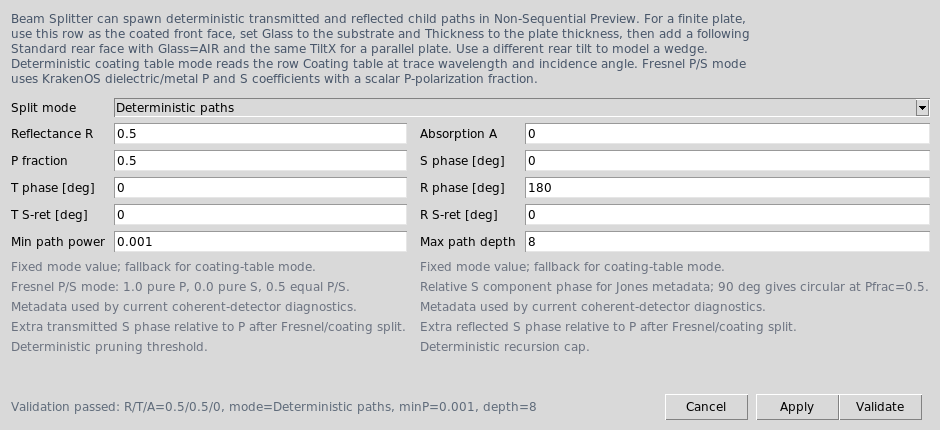
The beam-splitter settings dialog controls deterministic path splitting, Fresnel P/S input, output retardance, and recursion limits.
Use a physical source such as
Collimated disk sourceorGaussian beam. With a physical source, beam splitter, off-axis geometry, target surface, or non-sequential coating-probability request,Autoscene trace resolves toNon-Sequential Preview; explicitNon-Sequential Previewis still available.Source X/Y/Zset the physical launch origin, andSource L/M/Nset the normalized chief-ray direction. In this mode theObjectrow is a scene/reference datum, not the source of the launched rays.Leave
NS probabilistic coating splitoff for deterministic splitters.For a finite plate, set the splitter row
Glassto the substrate, setThicknessto the plate thickness, and add a followingStandardrow withGlass=AIRas the rear face. In the editable UI table, use the same rearTiltXas the front face for a parallel plate; use a different rear tilt to model a wedge.Right-click any grouped element and use
Element settings...orPath roleto mark it asCommon,Transmit,Reflect, orDetector. The first#cell shows a compact path-role badge such asTorRon the first row of the element.Right-click a
Beam Splitterrow and chooseAdd detector to transmitted path...orAdd detector to reflected path...to insert a detector plane at a distance measured along that central path.Use the table toolbar
Path viewdropdown when you want to show the full layout or isolate one discovered path. Row numbers remain KrakenOS surface indices even when the table is filtered.Click
Updateand inspect paths withActions -> Ray Inspector,Actions -> Trace Path Inspector, andActions -> Non-Sequential Scene Graph.

Path view filters the table and plot to the full layout or one traced
path after Update discovers deterministic splitter paths.
The Beam Splitter 50/50 Example uses an exact-count collimated disk source.
Each launched source ray creates transmitted and reflected trace records, so
the Ray Inspector can show the source-ray index, path power, and launch
metadata for each child path.
BRANCH_LABEL is the local leaf label, such as transmit or reflect.
BRANCH_PATH is the cumulative traced splitter path, for example
S1:BS1/transmit -> S4:BS2/reflect. Use BRANCH_PATH for cascaded
splitters, return paths, and future recombination diagnostics.
For small ray counts, the collimated and Gaussian physical source previews use equal-spaced meridional samples inside the requested radius. The outer preview rays are kept conservatively inside the source edge, which avoids accidental path loss on tilted finite plates whose projected clear aperture is smaller than their nominal diameter. Larger source bundles switch to deterministic golden-angle disk filling so the 3-D source footprint is represented.
Ray count is the number of launched source rays, not the final number of
drawn paths. A deterministic 50/50 splitter therefore produces up to
2 * ray_count displayed child paths: one transmitted and one reflected path
per source ray. If a finite aperture clips one path, the Ray Inspector will show
fewer child records for that path.
Path workflow tutorial
Use this workflow when you want to build a first two-path splitter layout without manually calculating the reflected detector pose.
Start the editor and press
Resetif the table is not empty.Load
Common Optical Layout -> Beam Splitter 50/50 Example.In
Source Field, chooseCollimated disk sourcefor ray-bundle debugging orGaussian beamfor a laser-style source.Set
Ray countto the number of launched source rays you want. With a deterministic splitter, each unclipped input ray can produce one transmitted child and one reflected child.Right-click the
50/50 coated front facerow and chooseBeam splitter settings.... ConfirmReflectance R = 0.5,Absorption A = 0, and deterministic splitting.Right-click the same front-face row and choose
Add component to transmitted path.... SelectDetector plane,Aperture stop,Thin lens,Refractive surface,Mirror, orObject Target, enter the distance from the splitter and clear diameter, then pressInsert. The olderAdd detector to transmitted path...shortcut opens the same dialog withDetector planepreselected.Right-click the front-face row again and choose
Add component to reflected path...orAdd detector to reflected path.... Enter the reflected-path distance and component parameters, then pressInsert.Click
Update. The 2-D/3-D plots should show source rays forking into the transmitted and reflected paths, subject to finite-aperture clipping. The 2-D plot labels discovered paths directly on representative rays asPath 1,Path 2, and so on. Use theShow labelscheckbox above the 2-D plot to hide these labels when dense sources, such as imported LED ray files, generate many sampled ray histories. Use the adjacentRaysselector to switch between every traced ray, detector-hit rays, and representative non-primary beam-splitter paths.Use
Path view -> Path 1: ...style entries to filter the table and 2-D plot to one discovered path.For a nested/cascaded splitter path, choose the traced
Path viewentry and useActions -> Add Component to Current Path View.... The helper derives the component frame from the latest tracedBRANCH_PATHsegment instead of assuming the nominal global+Zinput ray.To insert a real Edmund/Thorlabs catalog lens on a traced path, keep the traced
Path viewselected and useInsert -> Stock Lens to Current Path View...orActions -> Add Stock Lens to Current Path View.... The catalog importer adds aPath distancefield and writes the chosen stock lens as one rigid multi-row element on that path frame. The same dialog also exposes local X/Y offsets and local X/Y/Z tilts, so the block can be nudged or tipped in the selected branch frame without calculating global table values.Open
Actions -> Ray Inspector. The path rows should show matchingsource_rayvalues, split labels such astransmitandreflect, and path powers derived from the splitter settings.
The path-component helper inserts a native KrakenOS row before Image and
tags it with Element metadata. The component mapping is:
Dialog component |
Table row created |
Parameter meaning |
|---|---|---|
|
|
No extra parameter. Tagged as |
|
|
No extra parameter. Diameter is the clear stop. |
|
|
Focal length in millimetres, stored in the table |
|
|
Radius of curvature in millimetres. Add a second surface if you need a finite-thickness singlet. |
|
|
Mirror radius in millimetres; |
|
|
Semantic object-location row for source/object split fixtures. It returns one specular proxy ray. |
|
|
Lambertian object-scatter row. It spawns deterministic |
Example metadata for a reflected-path detector row:
{
    "element_id": "Reflect_detector",
    "element_name": "Reflect detector",
    "arm_role": "Detector",
    "parent_splitter": "Splitter",
    "branch_selector": "reflect",
    "branch_path": "",
    "arm_distance": 60.0,
    "local_decenter_x": 2.5,
    "local_decenter_y": -1.25,
    "local_tilt_x": 4.0,
    "local_tilt_y": -2.0,
    "local_tilt_z": 7.0,
    "path_component_type": "Detector plane",
}
local_decenter_x and local_decenter_y are transverse offsets in the
selected branch frame. local_tilt_x, local_tilt_y, and
local_tilt_z are applied relative to the branch-aligned surface frame
before the UI writes global TiltX/Y/Z values to the table.
For splitter-row context-menu placement, the helper uses the selected splitter
surface normal and the nominal incoming global +Z ray. This is correct for
the supplied straight-input beam-splitter examples. For nested/cascaded paths,
first click Update, choose a traced Path view entry, then use
Actions -> Add Component to Current Path View.... That helper derives the
origin and direction from the latest traced BRANCH_PATH ray segment,
places the component at the requested distance from the last splitter hit, and
saves exact branch_path metadata such as:
{
    "element_id": "Path_TR_detector",
    "element_name": "Path TR detector",
    "arm_role": "Detector",
    "parent_splitter": "BS1 transmit -> BS2 reflect",
    "branch_selector": "reflect",
    "branch_path": "S1:BS1/transmit -> S4:BS2/reflect",
    "arm_distance": 20.0,
    "path_component_type": "Detector plane",
    "path_frame_source": "traced_branch_path",
}
The traced-path helper covers arbitrary traced splitter-to-splitter or return
paths after Update. The stock-lens path importer uses the same traced frame
and keeps every imported catalog surface in one element block. It preserves the
catalog row spacing through path_component_axial_offset metadata and writes
global TiltX/Y/Z plus DespX/Y/Z values for each row so the block sits
on the selected path without manually calculating pose.
Example metadata added to every stock-lens row placed on a traced path:
{
    "element_id": "Path_TT_08068",
    "element_name": "Path TT 08068",
    "arm_role": "Transmit",
    "branch_selector": "transmit",
    "branch_path": "S4:BS1/transmit -> S8:BS2/transmit",
    "arm_distance": 35.0,
    "path_component_type": "Stock lens block",
    "path_component_part": "08068",
    "path_component_row_count": 2,
    "path_component_axial_offset": 3.21,
    "local_decenter_x": 1.5,
    "local_decenter_y": -2.0,
    "local_tilt_x": 3.0,
    "local_tilt_y": 0.5,
    "local_tilt_z": -1.0,
    "path_frame_source": "traced_branch_path",
}
To adjust a placed path element later, select the element block, right-click,
and choose Geometry -> Edit path-local pose.... The dialog edits
Path distance, Local X/Y offset, and Local tilt X/Y/Z in the same
branch-local frame used at insertion time, then rewrites the global
TiltX/Y/Z and DespX/Y/Z table cells. For traced BRANCH_PATH rows,
click Update first so the latest traced segment is available. The same
repose helper is also used when Element settings... is applied to a placed
path element, so saved path-component metadata is not lost.
When any numbered Path view is active, the editable table presents those
same path-local fields directly for path-placed components:
Table column in |
Meaning for path-placed rows |
|---|---|
|
Surface tilt relative to the selected branch frame. |
|
Transverse decenter in the selected branch frame. |
|
Longitudinal distance along the selected branch from the splitter or traced path-frame origin. |
Path view -> All paths switches back to the canonical global Tilt and
Desp columns. Only rows inserted by the path-component or path stock-lens
helpers use the virtual local columns; manually grouped/assigned rows keep
their normal global table values.
The Python example
KrakenOS/Examples/Examp_Phase6_Path_Component_Placement.py shows the same
helper calculations headlessly and prints the generated Tilt/Decenter rows.
Two-path doublet example
Load Common Optical Layout -> Beam Splitter Two Path Doublets for a complete
example where one cemented doublet is placed after the transmitted path and a
second cemented doublet is placed after the reflected path.
The row structure is:
Objectis a global reference plane; the Source panel launches the physical source bundle.Splitterrows model the tilted 3 mm BK7 50/50 plate.Transmit doubletrows are centered on the transmitted chief ray after the plate exit offset.Transmit path detectorreceives the transmitted path after that doublet.Reflect doubletrows are tilted so their local+Zaxis follows the reflected+Ypath.Reflect path detectorreceives the reflected path after that doublet.Imageremains a global diagnostic surface at the end of the canonical KrakenOS table.
The important pattern is the saved Element metadata. The transmitted
doublet rows use:
{
    "element_id": "TX_DBL",
    "element_name": "Transmit doublet",
    "arm_role": "Transmit",
    "parent_splitter": "BS1",
    "branch_selector": "transmit",
    "arm_distance": 33.0,
}
The reflected doublet rows use the same pattern with arm_role="Reflect"
and branch_selector="reflect". The reflected surfaces also use
tilt_x=-90 plus global decenter values so their physical surface normals
point along the reflected path. KrakenOS still traces against those physical
surface poses; the metadata is for path labels, focus selection, grouping, and
future path-workbench editing.
Manual path assignment
Use manual path assignment when you add or import components surface-by-surface:
Select contiguous rows that form one optical component.
Right-click the first
#cell and chooseGroup as Elementif the rows are not already grouped.Right-click the grouped element and choose
Path role -> Assign to Transmit pathorPath role -> Assign to Reflect path.Open
Element settings...if you need to set the parent splitter, split selector, path distance, or path-local offsets for documentation and future analysis.Use
Move UporMove Downto reorder the element within the same path.
The path assignment metadata does not force ray routing. KrakenOS still traces against actual geometry. The metadata is used by the editor for grouping, selection, row movement, saved-layout documentation, and path-aware analysis. The table currently focuses path rows by selecting and scrolling to them rather than hiding all other rows. This preserves the KrakenOS surface-index mapping while the virtual path-workbench table remains a metadata layer on top of the canonical KrakenOS surface list.
Path Workbench workflow
The intended beam-splitter workflow is:
Author the common path first: source, object/reference, pre-splitter optics, and the first splitter.
Click
Update. The editor traces deterministic paths and discovers path families.The 2-D plot labels discovered paths as
Path 1,Path 2,Path 3, and so on, with each label anchored to a representative ray. For nested splitters, the stable internal identity remains aBRANCH_PATHvalue such asBS1/transmit -> BS2/reflect.Show labelscontrols whether these plot annotations are drawn. Dense imported ray sources may create more traced histories than the logical splitter ports, so disable labels when the plot needs to show ray geometry rather than branch diagnostics. TheRaysselector is independent of labels.Beam-splitter pathshides direct primary source rays and draws representative splitter paths, which is often the readable view for LED rayfiles and cascaded splitters.Use
Path view -> All pathsto show the full global layout and full canonical table.Use
Path view -> Path 1: ...or another numbered path to filter the 2-D plot and editable table to the common path plus that path’s surfaces and traced rays.Use the beam-splitter row context menu to insert first-class path components when the selected path starts at that splitter. The helper computes the global row pose and saves path-local metadata.
For arbitrary traced
BRANCH_PATHvalues, keep the Path view selected and useActions -> Add Component to Current Path View.... Edits still map back to real KrakenOS surface indices; the global surface list remains the canonical trace geometry.To move or tip an already-placed path component, select its colored element block, right-click, and use
Geometry -> Edit path-local pose.... This is the safe workflow for nudging a detector, aperture, mirror, or stock lens along a branch without manually solving global decenter/tilt values.For path-placed rows, edit the same local values directly in the filtered
Path viewtable:Local X/Y,Local TiltX/Y/Z, andPath Dist. The editor immediately recomputes the canonical global row pose behind the scenes.
The current implementation starts this workflow with metadata-discovered
Path view filtering in the 2-D plot and editable table. The table is
filtered through an internal row-index map, so the first # column still
shows the real KrakenOS surface index. Adding a new row while a path is
selected tags that row with the selected path metadata. For path-local physical
placement, use Add component to transmitted/reflected path... on the
splitter row; freehand row insertion still requires explicit decenter/tilt
values. Placed path components and stock blocks can be reposed later through
Geometry -> Edit path-local pose... or by editing their local pose cells
directly while a numbered Path view is selected.
Michelson-style layouts with detector/output display metadata use the more
physical four-path convention instead: Path 1 for input/source-return,
Path 2 for the transmitted mirror path, Path 3 for the reflected mirror
path, and Path 4 for the detector output path. Use those path entries when
placing components in a Michelson path because they correspond to the four
visible optical paths around the splitter, not to individual T/R branch
histories.
Separate source and object status
The splitter implementation now separates illumination rays from the
object/field concept for physical sources. Collimated disk source,
Gaussian beam, and the random SourceRnd modes launch from the Source panel
origin and direction:
Source X/Y/Z: physical source origin in millimetresSource L/M/N: chief-ray direction cosines; the UI normalizes themRay count: launched source rays before deterministic path splitting
When one of these physical source modes is selected, sequential object/field
inputs that no longer apply are hidden. The Object
surface remains in the KrakenOS table as a reference plane and part of the
global scene geometry, but it is not the ray launch source. This is the current
source/object split.
The UI is still not a full non-sequential scene editor with independent
Source and Object nodes placed on different paths. That requires a
virtual path-workbench layer: the global KrakenOS surface list remains the
canonical trace geometry, while each path view presents only the components on
one path and maps edits back to their real surface indices.
For cascading splitters, use the same rule manually: assign each path element
to a parent splitter and split selector in Element settings.... The editor
will number each traced BRANCH_PATH as a Path # after Update and
will still associate saved element metadata with matching trace paths. This
means a bare splitter can expose Path 1 / Path 2 from actual traced rays
before downstream components have been assigned. For physical placement on one
of those traced paths, choose that Path view entry and run
Actions -> Add Component to Current Path View....
Right-angle illumination example
Load Layouts -> Beam Splitters / Folds -> Right-Angle Beam-Splitter
Illumination for the first explicit source/object split fixture:
S0 Object referencestays in the table as reference geometry. It is not the illumination emitter.Source 1is a physical collimated disk at(0, -80, 45) mmwith direction(0, 1, 0).The source direction is therefore 90 degrees to the object/reference
+Zaxis.The 45 degree deterministic splitter first reflects the side illumination branch toward the left-side
Object Targeton-Z.Object Targetis a semantic UI surface type. It traces as a specular reflective proxy so this fixture can keep one readable return ray from the object location.The object-target proxy reflects the return ray back to the splitter. The transmitted return branch then passes through a clear aperture and reaches the right-side final camera/Image row on
+Z.The first-pass side transmitted branch and the object-return reflected branch remain separate rejected paths and do not terminate on the camera.
The object row is still a reference plane, not the emitter. Use Diffuse
Object instead of Object Target when the object should spawn Lambertian
scatter branches. Full measured-BRDF/pySCATMECH support remains future work.
The standalone script is:
python KrakenOS/Examples/Examp_Right_Angle_Beam_Splitter_Illumination.py
The regression fixture is:
python -m KrakenOS.UI.validate_source_object_split
Michelson detector/interferogram workflow
Load Common Optical Layout -> Michelson Interferometer (Interferogram) for the
first Michelson-style geometry diagnostic. It uses an independent collimated
disk source at (0, 0, 0) with direction (0, 0, 1), a 45 degree
deterministic 50/50 splitter, one mirror in the transmitted path, and one mirror
in the reflected path. The returning rays hit the splitter a second time and
produce four ray-only output-port paths:
transmit then transmit
transmit then reflect
reflect then transmit
reflect then reflect
The splitter station is now modeled as an Edmund Optics 68551 25 mm cube
beam-splitter primitive. The editable table contains cube entrance/transmit
exit/reflect exit reference faces plus the internal 45 degree Beam Splitter
row. The reference faces are intentionally non-refracting table faces: they make
the cube size and placement visible without using the vendor STEP mesh as an
active trace solid. Use attachment/68551/step_68551.step or
iges_68551.igs through File -> Import Optical CAD/STL Solid... when you
need the mechanical CAD body for placement/export. Keep the internal
Beam Splitter row for actual split ratio, phase, and polarization physics,
because vendor CAD does not encode that optical prescription.
The preset is useful for checking geometry, path labels, source/object split,
branch ancestry, power, phase metadata, and the first-order detector
interferogram. Use Actions -> Ray Inspector or Actions -> Trace Path
Inspector after Update to inspect the trace paths. In the 2-D plot, the
four second-pass branch histories are clustered onto the two geometric output
ports: T -> T and R -> R leave through one port, while T -> R and
R -> T leave through the detector output port. In the supplied Y/Z
schematic that detector port is drawn below the splitter, opposite the
reflected return mirror path. The source-return histories, T -> T and
R -> R, are drawn back toward the input/reference side. These display
locations are stored in the final Image row’s advanced["Display2D"]
metadata so the schematic shows the logical Michelson paths even when the raw
non-sequential terminal segment from KrakenOS is not yet a full two-sided
beam-splitter port model.
The 2-D plot labels the four physical Michelson paths, not every directed
branch-history segment. This is the convention used by the editable table’s
Path view entries for this preset:
Path 1: Input / source return: source-to-splitter plus the source-return port.Path 2: Transmit mirror path: splitter-to-transmit-mirror and the return path from that mirror back to the splitter.Path 3: Reflect mirror path: splitter-to-reflect-mirror and the return path from that mirror back to the splitter.Path 4: Detector output path: splitter-to-detector output port.
Use Path view -> Path 2: Transmit mirror path or another path entry when
adding or inspecting components in one physical Michelson path. The table still
stores one canonical KrakenOS surface list underneath; the path view filters
that list to the common splitter path plus rows tagged to the selected path.
In Michelson-path layouts, the first # column also shows the path badge for
each row: P1 for the input/source-return path, P2 for the transmitted
mirror path, P3 for the reflected mirror path, and P4 for the detector
output path. These badges are row metadata labels, not traced branch-history
codes. The supplied Michelson preset stores its rows in the same P1 to
P4 order so the full table reads in path sequence.
To tag an existing arbitrary surface, select the row or contiguous group,
right-click the first # column, and use Path assignment -> Assign to
Path .... The editor will create/preserve an element group for those rows and
write the matching Michelson path metadata.
The preset includes two grouped Aperture surfaces in each path as a table
editing example. In the full Common view the rows are still one global
KrakenOS surface list, but the element metadata makes the path filters behave
as expected:
Path 1 aperture pairis taggedCommonand appears with the splitter inPath 1: Input / source return.Path 2 aperture pairis taggedReturnwithbranch_selector = "transmit".Path 3 aperture pairis taggedReturnwithbranch_selector = "reflect".Path 4 aperture pairis taggedDetector.
This is the intended manual workflow for now: switch to the path in Path
view, add or group the surfaces that belong to that path, then use
Element settings... if you need to inspect or correct the stored path
metadata. The orange aperture lines are intentionally simple and non-refractive;
they demonstrate component placement and can clip rays if their diameters are
made smaller than the source bundle.
The coherent interferogram still uses the recombined branch histories: T ->
R and R -> T share the detector output port, while T -> T and R ->
R share the source-return port.
The preset intentionally starts with one chief ray and compact clear apertures
so the plot reads like a Michelson schematic. Increase Ray count and
Source radius only after the geometry is clear; large image/reference
diameters make KrakenOS draw longer terminal output rays and can visually
overwhelm the cavity.
To see fringes, select the Interf analysis button and click Update.
With the default single-ray preset, Interf still falls back to the analytic
two-beam diagnostic so the layout reads like a Michelson schematic. Once
Ray count and Source radius are increased enough that the detector port
has a meaningful occupied-bin pattern, Interf automatically reuses the same
detector-bin coherent accumulation as CohDet. In that promoted mode the
displayed interferogram comes from the detector pixel field sum and its
branch-code self/pair decomposition, not from a pure path average. The
detector row stores the analysis settings in advanced["Interferogram"]:
{
    "analysis_title": "Michelson Interferogram",
    "detector_port": "cross",        # cross: T->R with R->T; return: T->T with R->R
    "detector_size_mm": 12.0,
    "pixels": 256,
    "fringe_tilt_x_mrad": 1.5,       # set to 0 for the aligned uniform limit
    "fringe_tilt_y_mrad": 0.0,
    "opd_offset_um": 0.0,
    "visibility": 1.0,
    "gaussian_q_weighting": "auto", # auto: use branch q for Gaussian beam sources
}
When the active Source panel uses Source model -> Gaussian beam and detector-bin promotion is
reliable, Interf also applies branch-carried Gaussian q envelope weights and
cumulative aperture/obscuration clipping before summing the detector pixels.
The annotation changes to Gaussian-q detector-bin coherent sum. This uses
the same branch phase, Jones/polarization vectors, and self/pair decomposition
as CohDet; it is not the old path-average fringe shortcut.
This is still not a full diffraction, higher-order mode-overlap, or thick tilted-plate field solver. Future work still needs FFT/mode propagation and full oblique astigmatic matrices beyond geometric detector-bin coherent sums.
Twyman-Green example
Load Common Optical Layout -> Twyman-Green Interferometer (Interferogram)
when you want the same tested return-path recombination workflow with
Twyman-Green names. The transmitted return path is tagged as the test optic
mirror, the reflected return path is tagged as the reference flat, and the
detector output path uses the same cross-port path pair, T -> R and
R -> T.
To use it:
Load the preset from
Layouts -> Common Optical Layout.Keep
Ray count = 1while checking the geometry and path labels.Replace or edit the
Test optic mirrorrow when you want to model a curved, decentered, or tilted test surface.Select
Interfand clickUpdate. Detector-bearing variants can use the same promoted detector-bin coherent accumulation; the current preset may still fall back to the analytic path-average diagnostic when no usable detector terminal samples are available.
The matching Python example is
KrakenOS/Examples/Examp_Twyman_Green_Interferometer.py. It builds the
splitter, test optic, reference flat, and detector in plain KrakenOS code,
traces the deterministic paths, and currently computes the analytic fallback
interferogram used when detector-bin promotion is not available.
Mach-Zehnder example
Load Common Optical Layout -> Mach-Zehnder Interferometer (Interferogram)
for the current Mach-Zehnder table and path-recombination diagnostic. It
includes two 50/50 beam-splitter rows, two fold-mirror rows, and two
output-detector rows. The first splitter sends one path through the transmit-path
mirror and the other through the reflect-path mirror; both paths then reach the
second splitter and leave through cross and return output ports.
The UI labels and table filters use physical paths, not branch histories:
Path |
Meaning |
|---|---|
|
Input/source path to |
|
|
|
|
|
|
|
|
To place user-added optics on a Mach-Zehnder path, select the row or element
group in the first # column, right-click, and choose Path assignment.
The Path view menu can then show only the chosen path plus its relevant
boundary splitter rows. Branch labels such as T->R and R->T remain
available in the Trace Path Inspector, but they are not used as the editable
table grouping because multiple branch histories can share the same physical
path.
Automatic path graph
For beam-splitter layouts that are not one of the named interferometer
presets, the UI also builds an automatic physical-path graph after Update.
The graph is derived from traced non-sequential rays:
Source points, beam-splitter hits, detector/terminal hits become graph vertices.
The polyline between two adjacent vertices becomes a candidate physical path.
Candidate paths are merged when they share the same endpoint vertices and the same intermediate surface sequence. This is why two branch histories can still become one editable physical path.
Path numbers are assigned by a traversal from the source vertex, with same-node branches ordered by their outgoing display angle.
Right-click
Path assignmentstores an explicitleg_idon the selected element group. This manual assignment wins when a future edit makes the automatic graph ambiguous.
This is a topology solver, not a fixed formula such as “three paths per beam
splitter”. A splitter is physically a ported graph node, and cascaded or nested
splitters add edges according to the actual traced connectivity. For reliable
automatic labels, run Update after changing splitter geometry.
Select Interf and click Update to generate the Mach-Zehnder
interferogram. The diagnostic still compares the two complementary paths at the
selected detector output, but when the detector sampling is dense enough it now
uses the same detector-bin coherent accumulation as CohDet instead of the
older pure path-average shortcut. Sparse one-ray previews still fall back to
the analytic view so the geometry remains easy to read.
The matching Python example is
KrakenOS/Examples/Examp_Mach_Zehnder_Interferometer.py. It prints the
branch paths, surface sequence, and path powers, then computes the analytic
fallback interferogram used when detector-bin promotion is not available.
Saved metadata
Layouts store the splitter settings in the row’s advanced dictionary:
{
    "surface": "Beam Splitter",
    "name": "50/50 coated front face",
    "diameter": 25.0,
    "tilt_x": 45.0,
    "thickness": 3.0,
    "glass": "BK7",
    "advanced": {
        "Element": {
            "element_id": "BS1",
            "element_name": "Splitter",
            "arm_role": "Common",
            "parent_splitter": "",
            "branch_selector": "",
            "arm_distance": 0.0,
            "local_decenter_x": 0.0,
            "local_decenter_y": 0.0,
            "local_tilt_x": 0.0,
            "local_tilt_y": 0.0,
            "local_tilt_z": 0.0,
        },
        "BeamSplitter": {
            "split_mode": "Deterministic paths",
            "reflectance": 0.5,
            "absorption": 0.0,
            "transmit_phase_deg": 0.0,
            "reflect_phase_deg": 180.0,
            "min_branch_power": 1e-3,
            "max_branch_depth": 8,
        }
    },
}
Element metadata is UI metadata. KrakenOS tracing remains geometry-driven;
the metadata lets the editor move elements within the same logical path and
gives future placement and analysis tools a stable path selector. If an element
is assigned to a path, Move Up and Move Down search for the previous or
next element with the same path role instead of crossing into another path.
The table Path view dropdown filters matching path elements while preserving
the surface-index mapping used by KrakenOS and by the table editors.
The loader also accepts legacy roadmap-style aliases:
{
    "mode": "ideal",
    "transmittance": 0.5,
    "loss": 0.0,
    "max_split_depth": 8,
}
Those aliases normalize to split_mode, reflectance, absorption,
and max_branch_depth.
Python example
The fixed-ratio direct API example is
KrakenOS/Examples/Examp_Beam_Splitter_50_50.py. It builds a splitter
front surface, attaches both BeamSplitter metadata and the coating fallback,
adds a rear AIR surface for substrate exit, and uses NsTraceLoop with
system.energy_probability = 0.
The coating-table direct API example is
KrakenOS/Examples/Examp_Beam_Splitter_Coating_Table.py. It sets
split_mode = "Deterministic coating table" and a coating table where
R=0.70 and A=0.05 at 45 deg and 0.55 um. Running it should
print reflected path power 0.700000 and transmitted path power
0.250000.
The Fresnel P/S direct API example is
KrakenOS/Examples/Examp_Beam_Splitter_Fresnel_Polarization.py. It sets
split_mode = "Deterministic Fresnel P/S" on a finite BK7 plate and runs
the same ray for polarization_p_fraction = 1.0, 0.5, and 0.0.
At 45 degrees, the printed reflected path power changes because KrakenOS
core RP and RS are different. The example also prints
BRANCH_JONES_P, BRANCH_JONES_S, and BRANCH_POLARIZATION_XYZ so you
can see the reflected mixed input become more S-heavy and inspect the global
electric-field direction carried to downstream analysis. The final example case
sets reflect_s_phase_deg = 90 to show how a coating-like reflected
retardance changes the complex S component without changing path power.
Minimal setup:
import KrakenOS as Kos

splitter_settings = {
    "split_mode": "Deterministic paths",
    "reflectance": 0.5,
    "absorption": 0.0,
    "polarization_p_fraction": 0.5,
    "polarization_s_phase_deg": 0.0,
    "transmit_phase_deg": 0.0,
    "reflect_phase_deg": 180.0,
    "transmit_s_phase_deg": 0.0,
    "reflect_s_phase_deg": 0.0,
    "min_branch_power": 1e-3,
    "max_branch_depth": 8,
}

wavelengths = [0.45, 0.55, 0.65]
angles = [0.0, 45.0, 70.0]
coating = [
    [[0.5 for _w in wavelengths] for _theta in angles],
    [[0.0 for _w in wavelengths] for _theta in angles],
    wavelengths,
    angles,
]

splitter = Kos.surf()
splitter.Name = "50/50 coated front face"
splitter.TiltX = 45.0
splitter.Thickness = 3.0
splitter.Diameter = 25.0
splitter.Glass = "BK7"
splitter.AxisMove = 0.0
splitter.BeamSplitter = splitter_settings
splitter.Coating = coating

rear = Kos.surf()
rear.Name = "BK7 plate rear face"
rear.Thickness = 60.0
rear.Diameter = 25.0
rear.TiltX = 45.0
rear.Glass = "AIR"
rear.AxisMove = 0.0

obj = Kos.surf()
obj.Name = "Input reference"
obj.Thickness = 45.0
obj.Diameter = 30.0
obj.Glass = "AIR"
obj.AxisMove = 0.0

image = Kos.surf()
image.Name = "Large diagnostic target"
image.Diameter = 100.0
image.Glass = "AIR"
image.AxisMove = 0.0

system = Kos.system([obj, splitter, rear, image], Kos.Setup())
system.energy_probability = 0
system.NsLimit = 120
Internal branch data
Each deterministic splitter hit can emit child records:
Data |
Purpose |
|---|---|
|
Preserve trace ancestry for each reflected/transmitted child. |
|
Carry optical power through splitter, coating, absorption, and bulk transmission. |
|
Preserve transmitted/reflected phase for coherent recombination. |
|
Preserve normalized branch Jones amplitudes in the splitter-local P/S
basis. Fresnel P/S mode updates these amplitudes from the P and S
coefficients; scalar fixed/coating modes pass the incident Jones state
through unchanged. |
|
Preserve a normalized global complex electric-field vector. Splitter P/S amplitudes are converted back to this vector on each child path, and non-split surfaces keep it transverse to the traced ray direction. |
|
Prune weak paths. |
|
Prevent recursive splitter explosions. |
|
Hard safety cap for pathological non-sequential layouts. |
The Ray Inspector, Scene Graph, Trace Path Inspector, CSV export, and path-aware analysis controls consume these child records instead of showing one stochastic path per launched ray.
Path throughput report
After clicking Update on a deterministic beam-splitter layout, open
Actions -> Path Throughput Report. The report groups complete traced leaf
rays by output/path, selector code, trace path, and terminal surface. It sums
branch_power * source_weight * source_power for each group and normalizes
against the unique launched source-ray weights, so it is useful for checking
whether transmitted/reflected outputs, detector ports, and source-return ports
carry the expected power.
The report columns are:
Column |
Meaning |
|---|---|
|
Human-readable output group such as |
|
Selector history from the beam splitter path. |
|
Last surface reached by the leaf ray. Detector rows tagged with
|
|
Sum of path power weighted by source ray weight and source power. |
|
|
|
Power-weighted optical path and geometric distance for that path group. |
Use Copy for a Markdown summary or Export CSV for downstream checking.
Use the Filter selector to limit the report to one output group, selector
code, or terminal detector/surface before copying or exporting. This is the
first path selector in the analysis workflow; later spot, PSF, MTF, and
detector-plane tools should reuse the same path identity model.
This is an incoherent throughput audit. It does not replace the current
Michelson/Twyman-Green/Mach-Zehnder Interf diagnostic and does not yet
perform detector-pixel coherent field summation.
Path-filtered detector analyses
The plot controls include an Analysis path selector. After pressing
Update on a deterministic beam-splitter layout, this selector is populated
from the same path identities used by Actions -> Path Throughput
Report:
All pathskeeps the existing sequential Spot/RMS behavior.Output: ...selects all leaf rays that reach one logical output group.Code: ...selects one transmit/reflect selector history such asT,R,TR, orRT.Terminal: ...selects rays that terminate on one detector or surface.
To inspect one path detector spot, detector PSF/MTF, detector power map, or first coherent detector sum:
Load or build a deterministic beam-splitter layout with detector rows.
Select
Spot,RMS,PSF,MTF,DetMap, orCohDetin the analysis mode controls.Click
Updateonce so path records exist.Choose an
Analysis pathentry such asOutput: Detector output portor a specificTerminal: S... Detectorentry.Click
Updateagain.

Detector and interferometer analyses are selected from the analysis toolbar
above the plot, then regenerated with Update.
Concrete DetMap examples
The quickest presets are under Layouts -> Beam Splitters / Folds:
Beam Splitter Two Path Doubletshas one detector on each splitter output. SelectDetMap, clickUpdate, chooseTerminal: ... Transmit path detectororTerminal: ... Reflect path detector, then clickUpdateagain.Michelson Interferometer (Interferogram)andTwyman-Green Interferometer (Interferogram)share a detector output port. SelectDetMaporCohDet, clickUpdate, chooseOutput: Detector output portor the detector terminal entry, then clickUpdateagain.Mach-Zehnder Interferometer (Interferogram)has cross and return output detectors. Choose a specific detector terminal ifAll pathsspans more than one terminal plane.
If the plot says no detector hits are available, the current trace did not end
on a detector row for the selected filter. Either click Update first, pick a
detector path/terminal from Analysis path, or insert a detector plane on
the path you want to measure.
For path-filtered Spot/RMS, the analysis uses the terminal hit points from
the traced non-sequential preview rays. If the selected terminal has a detector
surface transform, the plot uses detector-local X/Y coordinates; otherwise
it falls back to world X/Y. Marker size/color are weighted by
branch_power * source_weight * source_power. RMS reports a
power-weighted radius around the path centroid.
For path-filtered PSF and MTF, the analysis also uses the selected
detector terminal hit cloud instead of the centered sequential pupil model.
PSF builds a power-weighted detector-local histogram around the path
centroid. MTF computes a geometric detector MTF from the FFT of that
power-weighted PSF and reports tangential, sagittal, and selected reference
frequency values. These are geometric detector diagnostics for non-sequential
paths; they do not replace diffraction PSF/MTF for centered sequential
systems.
Use Actions -> Export Path PSF CSV... after Update to export the
same path-filtered PSF grid. Each row is one PSF bin and includes the path
filter, detector terminal, coordinate frame, ray count, bin count, centroid,
centered bin bounds/center, bin power, normalized power, total power, and peak
power.
Use Actions -> Export Path MTF CSV... after Update to export the
same geometric detector MTF curves. Each row is one spatial-frequency sample
and includes tangential, sagittal, and average MTF, plus the selected reference
frequency and interpolated selected-curve value used by the UI.
DetMap bins the same detector-local hit coordinates into a power map. It
requires one selected terminal plane; if a filter spans multiple detector
planes, choose a more specific Terminal: ... entry. The color scale is
Power per pixel and the annotation reports the selected path filter,
terminal, ray count, bin count, total binned power, and peak pixel power.
The Detector bins field in Plot Controls accepts Auto or an integer
from 4 to 512. Auto chooses a ray-count-dependent grid; a manual value is
better for regression checks or comparing two detector exports on the same
pixel grid.
Detector rows also have first-class detector settings. Right-click a detector
row and choose Diagnostics -> Detector settings... to set:
Setting |
Meaning |
|---|---|
|
Detector-local active area used by |
|
Per-detector sampling override. Blank means use the global Plot Controls
|
|
Metadata recorded with the detector row for future sensor/pixel models. |
Path-inserted Detector plane rows are created with detector settings whose
active area matches the inserted clear diameter. DetMap and CohDet always use
the selected terminal detector’s active area when detector-local coordinates
are available.
Use Actions -> Export Detector Map CSV... after Update to export the
same bins used by the plot. The CSV repeats the path filter, terminal,
coordinate frame, ray count, bin count, bin bounds, bin center, bin power,
total power, and peak power on each row so the detector map can be reconstructed
without reading the UI state.
CohDet is the first ray-binned coherent detector analysis. It requires one
selected detector terminal, then bins each traced detector hit into a pixel and
accumulates a complex field
sqrt(branch_power * source_weight * source_power) * exp(i phase). The phase
uses the traced optical path length, current wavelength, and BRANCH_PHASE
from deterministic splitter paths. If branch polarization metadata is
available, the displayed image is the global vector sum
|sum(Ex)|^2 + |sum(Ey)|^2 + |sum(Ez)|^2 per detector pixel, so orthogonal
path polarization states do not interfere artificially. Use an output or
terminal filter that contains recombined path families, for example
Output: Detector output port on a Michelson-style layout, otherwise the
plot is only a coherent sum of the selected one-family rays.
The detector-bin engine also decomposes the same grid into per-branch-code self
terms and complementary branch-pair interference terms. Interf now reuses
that same detector-bin accumulation whenever the selected detector output has a
reliable occupied-bin pattern; otherwise it falls back to the analytic
path-average view.
Diffr uses the same selected output or terminal filter as CohDet and
computes a vector Fraunhofer/angular-spectrum FFT of the coherent detector
field. The plot axes are angular coordinates in milliradians. This is useful
for checking the far-field structure implied by the current detector sampling
and phase metadata. It is still a detector-plane FFT, not full diffraction
propagation through every preceding surface.
Use Actions -> Export Coherent Detector CSV... after Update to export
the same coherent detector grid. Each row is one detector pixel and includes
the selected path filter, terminal, coordinate frame, branch codes,
wavelength, reference optical path, bin bounds/center, complex field
real/imaginary components, P and S field real/imaginary components, coherent
field X/Y/Z real/imaginary components, coherent intensity, normalized
intensity, incoherent power, total input power, total coherent power, and peak
intensity.
This is the preferred export when validating recombined detector phase outside
the UI.
CohDet is still a geometric ray-bin coherent model, not diffraction PSF/MTF,
Gaussian mode-overlap propagation, or a multilayer coating-stack vector solver.
The current polarization vector is transported by projection along traced ray
directions, and the UI supports simple per-output S-vs-P retardance controls;
full multilayer coating phase and birefringence remain future work.
Pixel size, ray sampling density, and whether both recombining paths land in
the same bins directly control the visible interference contrast.
Use a fixed Detector bins value when comparing coherent phase changes so
the exported complex field uses the same detector sampling in every run.
Path-analysis validation fixture
Run the lightweight regression fixture when changing beam-splitter tracing, detector rows, path labels, or path-filtered analyses:
python -m KrakenOS.UI.validate_branch_analysis
python -m KrakenOS.UI.validate_interferogram_detector_accumulation
python -m KrakenOS.UI.validate_diffraction_detector
python -m KrakenOS.UI.validate_detector_sampling_stability
The fixture loads detector-bearing common layouts headlessly, traces their
non-sequential paths, selects detector path filters, and verifies that
DetMap, path PSF, path MTF, path PSF/MTF CSV row
builders, and CohDet produce finite, non-empty results. The interferogram
promotion fixture separately checks that dense Michelson and Mach-Zehnder
bundles switch from analytic fallback to detector-bin coherent accumulation and
that the displayed interferogram matches the branch self-plus-pair
decomposition. The diffraction detector fixture checks that the Diffr
angular spectrum is finite, positive, grouped by source ray, and power
conserving under the unitary FFT. The sampling-stability fixture repeats
coherent and diffraction detector accumulation at multiple Detector bins
settings and verifies that the traced sample set, branch codes, source-ray
coherence groups, incoherent power, all-rays Jones-vector intensity, and FFT
power conservation stay consistent. Use --json for machine-readable output,
or repeat --layout "Layout Title" to validate a specific common layout.
Expected text-mode output is a PASS table for each default layout and check,
for example detector terminal discovery, DetMap, path PSF, path
MTF, path PSF/MTF CSV rows, and CohDet for
Beam Splitter Two Path Doublets and Michelson Interferometer
(Interferogram). The JSON form includes the same layout/check/status/message
records and is the preferred format for CI.
Run the Phase 6 path-workbench placement fixture when changing splitter component insertion, path metadata, or row pose calculations:
python -m KrakenOS.UI.validate_phase6_path_workbench
It loads Beam Splitter 50/50 Example headlessly and verifies that detector
plane, aperture stop, thin lens, refractive surface, mirror, and the legacy
detector shortcut all produce finite global Tilt/Decenter values plus the
expected Element path metadata. Use --json for machine-readable output.
For a single Phase 6 closure check, run:
python -m KrakenOS.UI.validate_phase6_complete
This aggregate fixture runs the STL prism media/refraction check, the splitter path-workbench placement check, and the path-filtered detector/PSF/MTF/CohDet analysis checks, plus the layout-defined multi-source scene-source check. Use it before changing non-sequential tracing, optical STL media handling, beam-splitter path placement, source metadata, or coherent detector binning.
Run the source/object split fixture when changing source-object separation, Source panel metadata, or side-port beam-splitter illumination:
python -m KrakenOS.UI.validate_source_object_split
It verifies the right-angle illumination example: Source 1 is an illumination
source, its chief ray is perpendicular to the object/reference axis, the first
reflected branch reaches the semantic Object Target, the object-return
transmitted branch reaches the camera sensor, rejected paths stay separate, and
the object/splitter/camera ordering is left-side object, splitter, right-side
camera. It also checks that the physical source marker is present in the 2-D
scene bundle.
Phase 2 source and path workflow
The branch-level implementation and status notes are maintained in
BRANCH_README.md at the repository root. That file consolidates the
source-driven ray bundle, path-aware metadata, placement-helper, analysis, and
validation notes that were previously split across root-level planning files.
Resizing a cube beam splitter (coupled cross-section)
An imported cube beam splitter can be resized from Open 3D (right-click
the body → Resize Solid…; see
STEP Overlay Promotion — Tiers and 2D/3D Parity). A cube splitter is two
cemented right-angle prisms, and its 45° coating spans a diagonal whose
normal is (1, 1, 0)/√2 — equal nonzero on two principal axes, ~0 on
the third. That geometry makes the resize 2-DOF, not 3-DOF:
The coating stays at 45° only when the two diagonal-spanning axes scale by the same factor. Growing them equally keeps a square cross-section; the third axis (the coating’s extrusion / depth direction) is free. So a detected splitter resizes as square cross-section + free depth. For the real 50 mm vendor cube,
50³ → 55×55×78holds the coating at(0.707, 0.707, 0), whereas an un-coupled55×50×78tilts it to(0.673, 0.74, 0)— no longer a 45° splitter.Coupling the cross-section also makes “both prisms grow together” automatic: the body is one shape scaled as a unit, so the cemented pair never separates.
The Resize Solid… popup enforces this by exposing a single
Cross-section field (which writes both coupled axes) plus a free
Depth; a plain solid with no detected coating shows independent
Width × Height × Depth instead. Coupling is detected from the original
B-rep’s clean analytic planes, while the scale itself runs in mesh space
(anchored vertex scale about the fixed face) so the planar coating face
stays planar. Validator:
python -m KrakenOS.UI.validate_open3d_solid_resize (includes checks
against the real vendor STEP, skip-if-absent).
Recovering the 45° coating as a selectable face
After promoting a cube splitter the user must assign the 45° coating, but
it is an interior face — buried between the two cemented prisms, not
clickable from outside, and a duplicate that the loader keeps in
document.faces (centroid (25, 25, 25), normal (1, 1, 0)/√2)
with zero triangles and excluded from outer_faces. So by default
it never became a face-editor row, and the splitter coating could not be
assigned.
load_step_analytic_document recovers it: one oblique
(non-axis-aligned) interior coating per duplicate group is force-included
as a real, tessellated outer_faces entry tagged recovered_coating,
preserved through normalize_optical_solid_face_metadata. It flows
uniformly to the face-tagged display mesh and the face-role metadata, so
it appears as a selectable Unassigned row with real geometry that the
user assigns Beam Splitter. The recovery is tightly gated — an
axis-perpendicular doublet cement (normal ~``(0, 0, 1)``) is not oblique,
and single-solid prisms have no interior duplicate, so neither is touched.
Validator:
python -m KrakenOS.UI.validate_open3d_beam_splitter_coating_recovered.
Note
The analytic display mesh is cached on disk keyed by source path +
mtime. An already-promoted row also keeps its baked OpticalSolidFaces
metadata, so to pick up the recovered coating an existing promoted
splitter must be re-promoted (delete + re-import + promote); fresh
imports get it automatically.
Future tilted/folded/non-sequential Gaussian optics
Current Gaussian beam reports use the centered ParaxMatrices() ABCD chain.
That is appropriate for centered refractive laser layouts and first-order beam
expanders. It is not a full oblique astigmatic model for tilted splitters,
folded mirrors, or arbitrary non-sequential paths.
The current Ray Inspector and Trace Path Inspector CSV already expose the
first prerequisite for that model: branch-local GB K, GB T, and
GB S axes at every traced hit. GB K follows the outgoing branch
direction, GB T is the tangential axis in the local plane of incidence,
and GB S is the sagittal axis. The frame is right-handed
(T x S = K) and is validated by
python -m KrakenOS.UI.validate_gaussian_branch_frames.
The next contract is now available as
KrakenOS.propagate_branch_gaussian_q(record, beam, surfaces=rows). It
accepts a Ray Inspector / Trace Path record, propagates independent
tangential/sagittal q states through the deterministic hit sequence, and
returns final branch-local beam radii, waist data, wavefront radii, and q
values. It handles branch free-space distances, flat splitter/mirror folds,
planar index changes, and conservative spherical power when the surface row and
hit record provide enough information. Each step also reports a centered
Gaussian clipping estimate from row Diameter / InDiameter:
clip_transmission, clip_loss, cumulative_clip_transmission, and
cumulative_clip_loss. The matching validator is:
python -m KrakenOS.UI.validate_gaussian_branch_q
A minimal scripted example is
KrakenOS/Examples/Examp_Branch_Gaussian_Q_Propagation.py. It loads the
Michelson preset, collects traced branch records, and prints the final q and
beam radius plus cumulative clipping transmission for every deterministic
branch path.
Detector-side Gaussian recombination is now available at detector-bin scope.
When Interf is promoted for an active Source-panel Gaussian beam source, it computes
branch-carried q traces for detector samples, applies a normalized Gaussian
envelope and cumulative clipping transmission to each sample, then performs the
same complex detector-bin recombination used by CohDet. Validate it with:
python -m KrakenOS.UI.validate_gaussian_detector_recombination
Remaining Gaussian work is higher-order field propagation: FFT/mode-overlap validation and fully oblique astigmatic matrices for tilted plates, thick cube splitters, and arbitrary non-sequential CAD.