Lens Fabrication Drawings
File -> Export Lens Drawing... generates an ISO 10110-style PDF fabrication
drawing for refractive lens elements in the editable surface table. It is meant
as a mechanical drawing starting point: verify tolerances, coating notes, and
shop-specific requirements before releasing it for manufacture.
Surface Property Workflow
Before writing the PDF, the UI opens Lens Drawing Surface Properties. The
same editor is also available from File -> Lens Drawing Surface Properties...
and the surface right-click Advanced menu.
Each row in that dialog maps to a physical optical surface row in the main table.
The values are stored in that surface row’s
advanced["DrawingProperties"] dictionary, so saving the layout as a Python
file preserves the fabrication metadata alongside the prescription. The dialog
also has Save JSON... and Load JSON... for an editable sidecar file that
can be reviewed or versioned before PDF export.
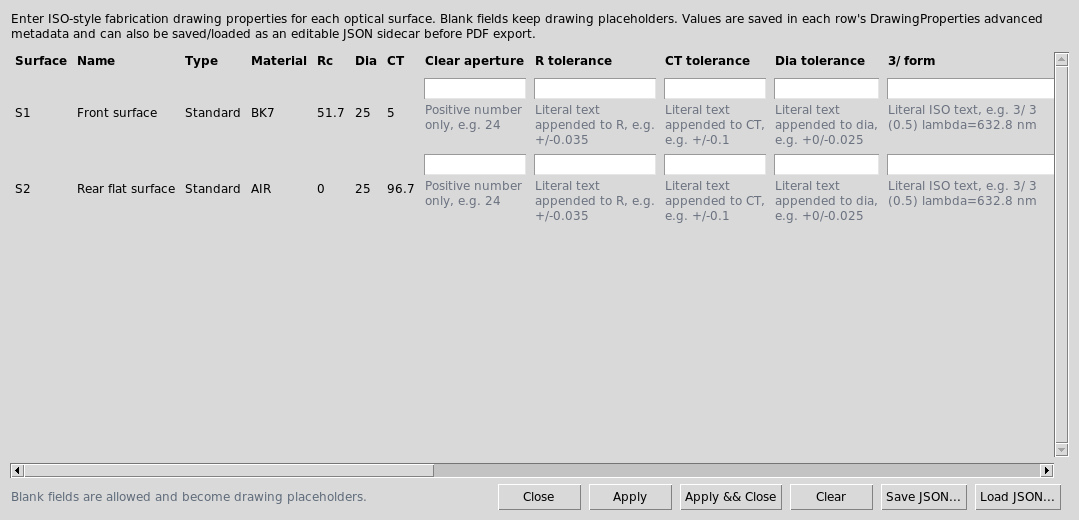
Lens Drawing Surface Properties stores fabrication metadata per optical
surface before PDF export.
The sidecar format is:
{
  "format": "krakenos.lens_drawing_properties.v1",
  "version": 1,
  "surfaces": [
    {
      "surface_index": 1,
      "label": "1",
      "surface": "Standard",
      "name": "Front surface",
      "material": "N-BK7",
      "properties": {
        "clear_aperture_mm": 24.0,
        "radius_tolerance": "+/-0.035",
        "thickness_tolerance": "+/-0.1",
        "diameter_tolerance": "+0/-0.025",
        "form_error": "3/ 3 (0.5) lambda=632.8 nm",
        "irregularity": "4/ -",
        "scratch_dig": "5/ 40-20 (MIL-PRF-13830B)",
        "coating_note": "1/4 wave MgF2 @ 550 nm",
        "material_note": "670/472",
        "cement_note": "NOA 61 OR EQUIVALENT",
        "centration_note": "14/ 1'",
        "edge_note": "Protective chamfers as needed",
        "other_requirement": "Edge blacken after coating"
      }
    }
  ]
}
Supported Fields
clear_aperture_mm is numeric and must be positive when present. The other
fields are text because fabrication drawings often use tolerance strings rather
than scalar values.
radius_toleranceAppended to the radius cell, for example
R 34.53+/-0.035 CX.thickness_toleranceAppended to the center-thickness dimension on the element page.
diameter_toleranceAppended to the outside-diameter dimension on the element page.
form_error,irregularity,scratch_dig,surface_noteExported into the ISO-style surface table as the
3/,4/,5/, and6/callouts.coating_noteExported as the coating/surface note callout for the left or right surface.
material_noteAppended to the glass material cell, useful for melt or glass-code notes.
cement_noteUsed for cemented interfaces in the assembly page table.
centration_noteandedge_noteAdded to the element-page notes section for centering and edge/chamfer requirements.
other_requirementFree-form literal text for any other surface-specific fabrication requirement. It is exported in the element-page notes section as
OTHER.
Example In A Layout File
The same metadata can be authored directly in a saved Python layout:
surfaces.append({
    "surface": "Standard",
    "name": "Front surface",
    "rc": 34.53,
    "thickness": 9.0,
    "diameter": 25.0,
    "glass": "N-BK7",
    "advanced": {
        "DrawingProperties": {
            "clear_aperture_mm": 24.0,
            "radius_tolerance": "+/-0.035",
            "thickness_tolerance": "+/-0.1",
            "form_error": "3/ 3 (0.5) lambda=632.8 nm",
            "scratch_dig": "5/ 40-20 (MIL-PRF-13830B)",
            "coating_note": "1/4 wave MgF2 @ 550 nm",
            "other_requirement": "Edge blacken after coating",
        }
    },
})
Reference Behaviour
The included attachment/Lens/isop_32323.pdf Edmund Optics drawing shows the
same style of data: an assembly sheet plus individual lens sheets containing
radius tolerances, clear aperture, ISO 3/ through 6/ surface callouts,
coating notes, material notes, and cement notes. KrakenOS fills the matching
fields when present and leaves placeholders when a shop-specific value is still
unknown.