PupilCalc Tool
This page is a faithful conversion of Section 5 of the provisional manual
(KrakenOS/Docs/USER_MANUAL_KrakenOS_Provisional.pdf, pages 21–27).
The system aperture — commonly the aperture stop (Ref. 5, §6.2) — is the element that defines how much light passes through the optical system. The image of the aperture formed by all elements in front of it is the entrance pupil; the image of the entrance pupil formed by the whole system is the exit pupil. The entrance pupil is not necessarily defined by the first element: sometimes it is set by a mechanical element rather than an optical surface.
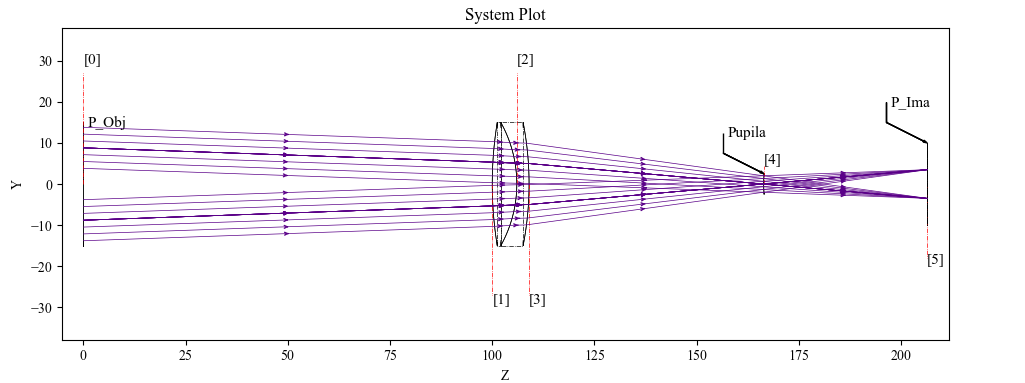
Figure 4. Visualization of two beams that coincide at the position defined as the pupil. (See appendix 7.10 — Examp_Doublet_Lens_Pupil.py.)
In the example above, the aperture stop sits on surface 4. Two beam fans arrive at field angles of +2° and −2°; their rays are collimated and pass together through the stop.
Tracing rays uniformly across the pupil one-by-one is awkward — fields with
different origins on the object plane each need their own ray-direction
calculations. PupilCalc automates that by sampling the pupil for a given
field and aperture definition.
W = 0.4
Surf = 4
AperVal = 10
AperType = "EPD"
Pup = Kos.PupilCalc(Doublet, Surf, W, AperType, AperVal)
Constructor arguments:
Doublet— the optical system built fromKos.systemSurf— index of the aperture-stop surface (surface 4 in Figure 4)W— wavelength at which the entrance and exit pupils are evaluatedAperType—"STOP"(Surfis the aperture stop) or"EPD"(AperValis the entrance-pupil diameter)AperVal— aperture-stop diameter or entrance-pupil diameter, depending onAperType
Pupil parameters
After construction, the resulting object exposes the pupil parameters:
Attribute |
Meaning |
|---|---|
|
Entrance-pupil radius. |
|
Entrance-pupil position. |
|
Exit-pupil radius. |
|
Exit-pupil position. |
|
Exit-pupil position relative to the focal plane. |
|
Exit-pupil orientation. |
The pupil position is computed even when surfaces are decentered or tilted — in that case the displaced pupil becomes relevant when computing aberrations.
Automatic ray generation
PupilCalc also generates rays that uniformly sample the real pupil. The
sampling is configured through the attributes below.
Attribute |
Meaning |
|---|---|
|
Integer pupil-sampling parameter. Default |
|
Pupil pattern. Allowed values:
|
|
Field type. |
Pup.FieldX = #Pup.FieldY = # |
Field value on the X and Y axes, in millimetres or degrees as set by
|
To convert the unit-pupil sampling into real-world origins and direction cosines:
x, y, z, L, M, N = Pup.Pattern2Field()
x, y, z are the origin coordinates and L, M, N the direction cosines.
The arrays can be iterated to trace each ray:
for i in range(0, len(x)):
    pSource_0 = [x[i], y[i], z[i]]
    dCos = [L[i], M[i], N[i]]
    Doublet.Trace(pSource_0, dCos, W)
    Rays.push()
The ray origins themselves can also be plotted. A hexapolar pattern is shown below.
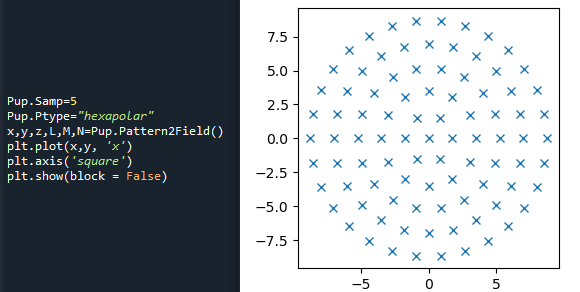
Figure 5. Generated code and pattern for the ray origins with a hexapolar distribution.
And the corresponding spot diagram at a 2° field:
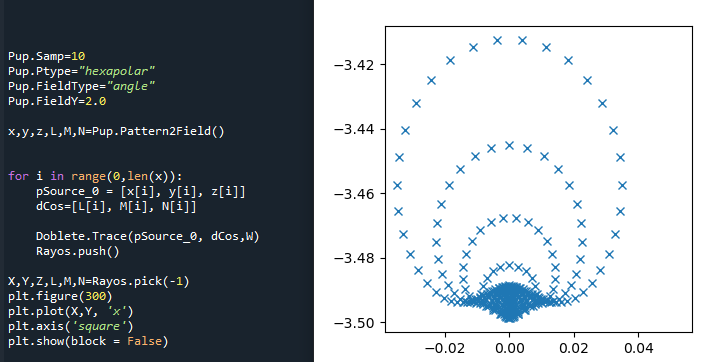
Figure 6. Code and spot diagram generated with a hexapolar pattern and a field angle of 2°.
When analyzing several fields, build a fresh pattern for each one and store
the traces in separate Raykeeper containers to keep the results from
mixing.
5.1 Atmospheric refraction in PupilCalc
When FieldType is "angle" — appropriate for telescopes, where rays
arrive from infinity — PupilCalc can apply an atmospheric-refraction
correction by deferring to the open-source AstroAtmosphere library (Ref. 3).
AstroAtmosphere computes the ray deviation from the observatory’s physical
parameters: geographic latitude (deg), site altitude (m), humidity, CO₂
content (ppm), reference wavelength and zenith distance (deg). The settings
below configure PupilCalc to apply that correction.
Pup.AtmosRef = 1       # 0 to disable, 1 to enable
Pup.T  = 283.15        # Temperature (K)
Pup.P  = 101300        # Atmospheric pressure (Pa)
Pup.H  = 0.5           # Humidity (0 to 1)
Pup.xc = 400           # CO2 (ppm)
Pup.lat = 31           # Latitude (degrees)
Pup.h  = 2800          # Observatory altitude (m)
Pup.l1 = 0.60169       # Reference wavelength (µm)
Pup.l2 = 0.50169       # Wavelength of interest (µm)
Pup.z0 = 55.0          # Zenith distance (degrees)
The example below generates three groups of rays for the same telescope at three different wavelengths:
W1 = 0.50169
Pup.l2 = W1
xa, ya, za, La, Ma, Na = Pup.Pattern2Field()

W2 = 0.60169
Pup.l2 = W2
xb, yb, zb, Lb, Mb, Nb = Pup.Pattern2Field()

W3 = 0.70169
Pup.l2 = W3
xc, yc, zc, Lc, Mc, Nc = Pup.Pattern2Field()
Each group is traced and pushed into its own Raykeeper:
for i in range(0, len(xa)):
    Telescope.Trace([xa[i], ya[i], za[i]], [La[i], Ma[i], Na[i]], W1)
    Rays1.push()

for i in range(0, len(xb)):
    Telescope.Trace([xb[i], yb[i], zb[i]], [Lb[i], Mb[i], Nb[i]], W2)
    Rays2.push()

for i in range(0, len(xc)):
    Telescope.Trace([xc[i], yc[i], zc[i]], [Lc[i], Mc[i], Nc[i]], W3)
    Rays3.push()
Plotting the per-wavelength spot diagrams shows a separation of roughly 72 µm between the extreme wavelengths (blue and green crosses in Figure 7):
X, Y, Z, L, M, N = Rays1.pick(-1)
plt.plot(X * 1000.0, Y * 1000.0, 'x', c="b")

X, Y, Z, L, M, N = Rays2.pick(-1)
plt.plot(X * 1000.0, Y * 1000.0, 'x', c="r")

X, Y, Z, L, M, N = Rays3.pick(-1)
plt.plot(X * 1000.0, Y * 1000.0, 'x', c="g")

Figure 7. Images formed by a telescope that are spectrally displaced by the action of atmospheric refraction.