STEP Overlay Promotion — Tiers and 2D/3D Parity
How an imported STEP file becomes traceable optical geometry in KrakenOS, why there are three different representations, and which row-level actions must remain available in the 3D inspector to match what the 2D surface table can already do.
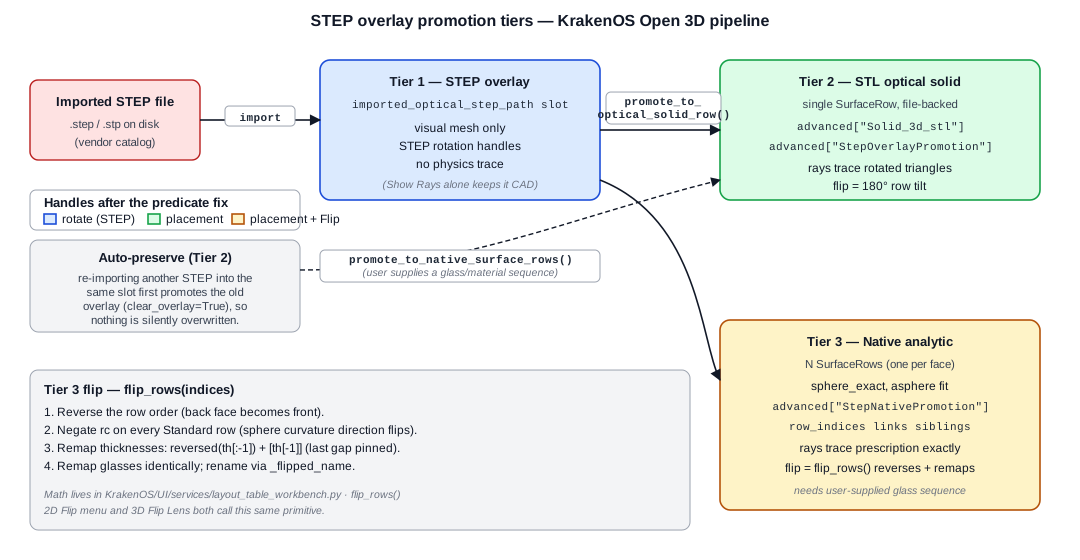
Tier 1 (display-only STEP overlay) → Tier 2 (single STL-backed row) or Tier 3 (one analytic row per face) → trace-ready optical geometry. The tier choice changes how flipping, scene-placement handles, and physics tracing behave.
Why three tiers
Importing a STEP file from a vendor catalog gives you triangulated CAD geometry. KrakenOS has to bridge that to a sequential prescription that can be ray-traced. Each tier is a different point on the trade-off curve between fast to import and physically rigorous:
Tier 1 keeps the STEP as a display-only overlay. Cheap and reversible — but rays don’t trace through it.
Tier 2 wraps the whole STEP body in a single
SurfaceRowbacked by an STL mesh. Rays trace against the rotated triangles, so it’s a refractive/reflective solid in the scene, but interior surface curvatures are approximated by triangle facets.Tier 3 parses the STEP B-Rep, fits each analytic face (sphere, asphere, plane) to a true KrakenOS surface, and inserts one row per face. The lens traces as exact analytic surfaces — at the cost of needing a glass/material sequence and surfaces that the fitter recognises.
Tier 1 — STEP overlay
Triggered by Import Optical STEP (and the corresponding LED / Camera /
Lens slots). The STEP path is stored in
editor.imported_optical_step_path (one slot per
STEP_OVERLAY_LABELS = ("lens", "optical", "led", "camera")), the mesh
is tessellated for display, and the overlay carries placement state
(optical_step_rotation_x_deg, optical_step_axis_offset_xy, etc.).
The 3D inspector renders it as an interactive body with STEP rotation
handles (_actor_step_rotate_map) anchored at the overlay centroid.
Pickable: yes (face hover/selection works, axis-snap works).
Traceable: no — rays do not propagate through Tier 1 bodies unless an explicit physics preview is requested.
Handles: STEP rotation handles (X/Y/Z arcs about the overlay centroid).
Flippable: yes — a 180° rotation handle click rotates the overlay itself, but only the visual — until you promote, it’s not in the trace.
Tier 2 — STL optical-solid row
Triggered by Promote STEP to Optical Solid Row, or automatically by
_preserve_unpromoted_step_overlay when a slot is about to be reused
for a different import. The current transformed mesh is saved to
CAD_CACHE/promoted_step_overlays/<label>_<hash>.stl and a fresh
SurfaceRow is inserted with two key markers in row.advanced:
Solid_3d_stl— absolute path to the cached STL (this is what_file_backed_stl_row_at()looks for, and the gate for several legacy handle/feature predicates).StepOverlayPromotion— provenance: source STEP path, promotion step label, baked-in rotation/offset state, axial reserve, etc.
The lens is now a single row that traces as a refractive STL solid. The
sequential trace pierces the triangle mesh; rotating the row (tilt_x,
tilt_y, tilt_z) rotates the mesh and the trace obeys.
Pickable: yes (file-backed body, scene placement handles apply).
Traceable: yes.
Handles: scene-placement translate + rotate handles (
_add_scene_placement_translate_handles,_add_scene_placement_rotate_handles).Flippable: 180° rotation about Y is the natural flip; the STL rotates, rays still intersect the same triangles in the rotated frame, physics is preserved.
Tier 3 — Native analytic rows
Triggered by Promote STEP to Native Rows (the user supplies a
glass/material sequence such as BK7, F2, AIR for a cemented
achromat). reconstruct_step_native_surfaces walks the STEP B-Rep,
fits each external face to an analytic surface, and produces N
SurfaceRow objects (one per face). Each row’s advanced carries a
StepNativePromotion block:
row.advanced["StepNativePromotion"] = {
    "step_label": "optical",
    "source_step_path": ".../step_49665.step",
    "material_sequence": ["BK7", "F2", "AIR"],
    "row_indices": [3, 4, 5],         # all siblings of this group
    "applied_row_pose": {...},        # row tilt/desp inherited
                                      # from the overlay's pose at
                                      # promotion time
    "reconstruction": {...},          # surface-fit diagnostics
}
The row_indices field is the canonical group membership marker —
_lens_row_group_for_row() resolves any row in the group back to the
full sibling list.
Pickable: yes (now that the handle predicate accepts promoted rows).
Traceable: yes, exactly — each surface is an analytic sphere/asphere.
Handles: scene-placement handles appear (after the predicate fix); a single-row rotation only rotates that surface. The arc body and both arrowheads are pickable, so clicking the curved rotation handle after snap/trace is equivalent to clicking its positive arrowhead.
Flippable: yes. Multi-row native groups use
flip_rows(); a single row-backed STEP/STL solid uses a 180 degree row-pose flip about the world Y axis from the same Open 3D row-actions menu.
Saved Tier 2 rows with a source STEP path
A reopened layout may contain a single Solid_3d_stl row that came
from an optical STEP lens before native promotion existed. Open 3D now
checks those saved rows during preview tracing. If the source STEP is
axisymmetric and reconstructable, the trace path temporarily expands the
single saved row into native analytic SurfaceRow siblings, preserves
the original total table thickness, and uses those analytic rows for ray
physics. The saved row remains the layout object, and unsupported STEP
solids still fall back to the mesh-backed Tier 2 path.
Validator: python -m KrakenOS.UI.validate_open3d_saved_step_native_trace.
Flipping a Tier-3 lens: why it’s not a rotation
For a Tier-2 STL solid, “flip” really is “rotate the mesh 180°” — the ray trace traverses the rotated triangles and the physics works out. For a Tier-3 native group, that doesn’t work: the rows still get traced in the declared front-to-back order, so even if you rotate every row’s tilt by 180° you’d visually flip the lens while the prescription continues to be “front sphere first.” The ray would hit the same surfaces in the same order, regardless of orientation.
A real flip changes the prescription. That’s what flip_rows() does:
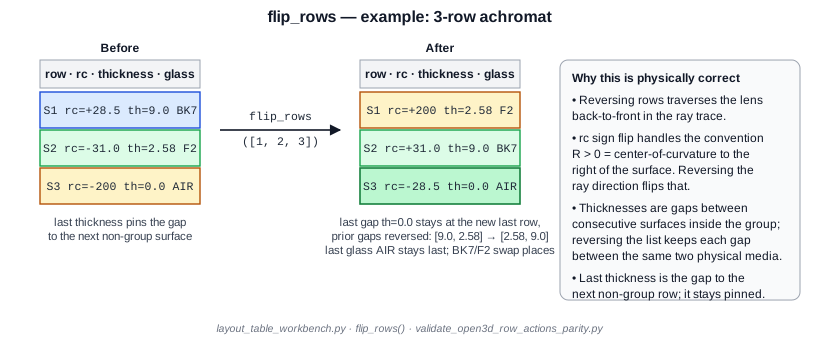
The four mechanical steps:
Reverse the row order — what was the back face is now traced first.
Negate
rcon everyStandardrow (KrakenOS uses the convention R > 0 when the center of curvature is to the right of the surface; reversing ray direction flips that).Remap thicknesses:
reversed(th[:-1]) + [th[-1]]. The interior gaps between consecutive surfaces in the group get reversed; the last thickness pins the gap from the new back surface to whatever non-group row follows (object, next element, image), so it must stay in place.Remap glasses the same way; rename rows via
_flipped_name.
The primitive lives in layout_table_workbench.py:
# KrakenOS/UI/services/layout_table_workbench.py
def flip_selected(self) -> None:
    if not self.table.selection():
        return
    self.flip_rows(self._selected_table_indices())

def flip_rows(self, indices: list[int]) -> bool:
    cleaned = sorted({int(v) for v in indices
                      if 0 <= int(v) < len(self.rows)})
    if len(cleaned) < 2:
        return False
    # ... reverse, negate rc, remap thickness/glass, rename, sync ...
    return True
Both the 2D surface-table Flip menu item and the 3D Row Actions →
Flip Lens menu item go through flip_rows. That’s the parity
guarantee — there’s exactly one implementation of “flip”, and the two
inspectors agree on what it means.
2D ↔ 3D row-action parity
The 2D surface-table context menu (main_context_menu.py) carries a
deep menu of row-level actions. Many of them — Shape Builder, Coating
editor, paraxial solves, tolerance manufacturing — are 2D-only because
they don’t have a meaningful 3D-spatial trigger. The ones that do have
a spatial meaning must be reachable from a 3D right-click on a lens or
prism body.
The current parity table:
Action |
2D context menu |
3D right-click |
|---|---|---|
Flip / reverse element |
yes |
yes (Flip Lens for groups) |
Move element up |
yes |
yes |
Move element down |
yes |
yes |
Duplicate |
yes |
yes |
Delete |
yes |
yes |
Group as element |
yes |
yes |
Ungroup element |
yes |
yes |
Element settings… |
yes |
yes |
Set face function (mirror, …) |
n/a (face-level) |
yes (face menu) |
Promote STEP to optical solid |
n/a |
yes |
Resize Solid… |
n/a |
yes (imported STEP body) |
Convert Type |
yes |
2D only |
Insert Component Below |
yes |
2D only |
Apply Material / Coating |
yes |
2D only |
Shape Builder / UDA |
yes |
2D only (dialog) |
Tolerance / Solve menus |
yes |
2D only |
The 3D side builds the cascade in
open3d_face_assignment.py · _build_row_actions_cascade:
# KrakenOS/UI/services/open3d_face_assignment.py
def _build_row_actions_cascade(self, parent_menu, row_index: int) -> None:
    editor = self.editor
    group = editor._lens_row_group_for_row(int(row_index))
    is_group = len(group) >= 2

    def _select_group() -> None:
        editor._select_table_indices(group, focus_index=group[0])

    def _do(action) -> None:
        _select_group()
        action()
        self.refresh_from_editor(force_retrace=True)
        self.highlight_row(group[0])

    actions = tk.Menu(parent_menu, tearoff=False)
    actions.add_command(
        label="Flip Lens (reverse element)" if is_group else "Flip / reverse selected element",
        state="normal" if is_group else "disabled",
        command=lambda: _do(lambda: editor.flip_rows(group)),
    )
    # ... move up/down, duplicate, delete, group/ungroup, element settings ...
    parent_menu.add_cascade(label="Row Actions", menu=actions)
The cascade is offered in two right-click branches:
Right-click on a file-backed STL row (Tier 2): face-function menu plus the Row Actions cascade.
Right-click on a promoted optical-solid row that isn’t file-backed (Tier 3 native): Row Actions cascade only (no face-function items, since faces are analytic surfaces, not STL triangles).
Handle eligibility — the predicate that gates the rotation rings
_show_scene_placement_handles() decides whether the 3D inspector
draws scene-placement translate/rotate handles for the currently-picked
row. The historical gate was “only file-backed STL rows”, which meant
Tier 3 native promotions silently lost their handles — clicking the lens
would highlight it but the handles never appeared.
The current predicate accepts any promoted optical-solid row:
# KrakenOS/UI/open3d_inspector.py
row_eligible = False
if active_row_index is not None and 0 <= active_row_index < len(self.editor.rows):
    if self.editor._file_backed_stl_row_at(active_row_index) is not None:
        row_eligible = True
    else:
        row_eligible = bool(
            self.editor._is_any_promoted_optical_solid_row(
                self.editor.rows[active_row_index]
            )
        )
picked_row_has_handles = bool(row_eligible and self._show_rotation_handles())
The companion helper
_is_any_promoted_optical_solid_row returns True when the row
carries either StepOverlayPromotion (Tier 2) or StepNativePromotion
(Tier 3). The complementary
_lens_row_group_for_row returns the sibling indices for Tier 3
groups so any action (handles, flip, refresh) can operate on the whole
lens, not just the single picked surface.
Validation contract
KrakenOS/UI/validate_open3d_row_actions_parity.py enforces:
flip_rowsis the programmatic primitive andflip_selecteddelegates to it (so 2D and 3D never diverge on flip semantics).The handle predicate accepts promoted rows.
The 3D right-click cascade wires the spatial 2D actions.
flip_rowsreverses + negates rc + remaps thickness/glass correctly on a synthetic 3-row achromat group (numerical check, not just static source inspection).
Run it standalone:
python -m KrakenOS.UI.validate_open3d_row_actions_parity
Slide along the optical axis
Tier 2 and Tier 3 promoted bodies share a 1-DOF interaction: Slide along axis, toggled from the Carry toolbar. While the mode is on, clicking the lens body and dragging projects the cursor motion onto the world Z axis only — off-axis displacement and rotation are suppressed. The drag uses the same snap-step as the scene placement settings on the row, and the move is committed to the history stack on mouse release.
The semantic is preserve overall track length — every row downstream of
the lens stays at its absolute Z position; only the gap before the lens
grows by Δz and the gap after shrinks by the same amount:
# KrakenOS/UI/services/scene_placement_commands.py
def slide_lens_along_axis(self, row_index, delta_z_mm, ...):
    group = self._lens_row_group_for_row(row_index)
    preceding_index = group[0] - 1
    trailing_index = group[-1]
    self.rows[preceding_index].thickness += delta_z_mm
    self.rows[trailing_index].thickness   -= delta_z_mm
    # internal group thicknesses untouched — lens stays rigid.
The slide is rejected (status bar warning) if it would push either gap
thickness below zero, so the lens can never overrun a neighbouring
element. Dragging batches row edits and redraws once on release, which
keeps large Open 3D scenes responsive. Validator:
python -m KrakenOS.UI.validate_axis_slide.
Resizing an imported solid (drag a face)
An imported STEP body can be resized in place from Open 3D: right-click the body → Resize Solid…. The popup is prefilled from the solid’s current dimensions and edits them numerically — the “direct-edit the thickness” step of the request. A detected beam-splitter cube shows a 2-DOF form (a single square Cross-section + a free Depth); any other solid shows independent Width × Height × Depth. The coupling is not cosmetic: a cube splitter is two cemented right-angle prisms whose 45° coating stays at 45° only if the two diagonal-spanning axes scale by the same factor, so the cross-section field writes both coupled axes to one value while depth is free (see Beam Splitters).
Two design points make the resize safe for the promotion pipeline:
Mesh-space, anchored scale — not a B-rep GTransform. A non-uniform
BRepBuilderAPI_GTransformsilently degrades the analyticPlanefaces toBSpline, which would poison the face-role / analytic-fit heuristics. So the resize scales the loaded base mesh vertices about an anchor on the fixed face (the dragged face moves; the opposite face stays put), which is exact for box/prism solids — planar faces stay planar. Coupling detection still reads the clean analytic planes off the original B-rep.Promotion inherits the resize for free. The builders mesh the transformed overlay and fold the resize signature into their cache key, so the cached STL, promotion bounds, and promoted face centroids/normals all reflect the resized body — the user then assigns faces and glues the body onto a source (e.g. the LED) with the existing placement metadata, no new mechanism.
The gesture’s planning core is pure and renderer-free
(KrakenOS/UI/services/open3d_resize_gesture.py): plan_face_drag
turns a grabbed-face native normal into which axis grows, which end is
anchored, and whether the cross-section pair couples;
resolve_resize_drag returns exactly the (target_extents,
anchor_axis, anchor_at_max, coupled) tuple the numeric popup’s apply
path already consumes, so a future drag-arrow handle and the popup commit
on one tested codepath. Validators:
python -m KrakenOS.UI.validate_open3d_solid_resize (geometry kernel),
…validate_open3d_solid_resize_overlay (overlay/promotion wiring), and
…validate_open3d_resize_gesture (the planner, with a
geometry-integration check that a coupled cross-section drag keeps the
coating at 45° while a single-axis change would tilt it).
Off-beam promoted solids are display-only
A promoted optical solid dragged clear of the beam path is treated as a display-only scene body: it still draws, but contributes zero optical effect until it is moved back onto the beam or given a coating. This matches the non-sequential North Star — a solid the rays never reach cannot bend them.
The mechanism guards the single prescription chokepoint. A row’s lateral
drag stores its offset in row.desp_x / desp_y; left unchecked,
_build_system_from_specs would copy that onto surface.DespX /
DespY as a propagating coordinate break, dragging the off-axis body
into the centered prescription and corrupting every paraxial / best-focus
/ spot-RMS / image-circle / live-trace solve (they all funnel through that
one builder). offbeam_optical_solid.neutralize_offbeam_inert_solids,
called at the top of the builder, replaces each off-beam inert
promoted solid with a flat zero-power AIR surface at the on-axis station —
same thickness/diameter, so the surface count and axial chain are
preserved, but desp/tilt are zeroed and the body’s optical metadata is
dropped. A coated splitter or an on-/near-beam solid stays in the trace;
an intentional decentered mirror is untouched. “Off-beam” is conservative:
the nearest transverse edge must clear the beam radius by ≥2×. Validator:
python -m KrakenOS.UI.validate_open3d_offbeam_solid_display_only.
Diagnosing “my promoted lens does not refract”
A common surprise after Tier 2 promotion: rays pass straight through the lens as if it were a flat plate. There are two independent reasons for this and they need different fixes:
Reason 1 — sequential ``rc`` is zero.
A Tier 2 promotion writes a SurfaceRow with surface="Standard"
and rc=0 because the STL body alone doesn’t volunteer a curvature.
The KrakenOS sequential tracer reads rc to decide refraction at
the surface, so an rc=0 row is mathematically flat. Whether the
underlying STL mesh is biconvex, plano-convex, or anything else is
irrelevant to the sequential pass — it sees a window.
Reason 2 — non-sequential face functions are “Unassigned”.
The non-sequential tracer intersects rays against the STL triangles
and decides what to do at each face based on its
OpticalSolidFaces.faces[*].function. Right after promotion every
face is Unassigned (or marked as Transmit/Port for plumbing
ports), neither of which causes refraction. With every face
unassigned, the non-sequential tracer treats the body as transparent —
rays pass through without ever changing direction.
How to tell which case applies to your row, from the saved layout:
# Reason 1 indicator
row.rc == 0.0  and  row.surface == "Standard"

# Reason 2 indicator
row.advanced["OpticalSolidFaces"]["faces"][*]["function"] == "Unassigned"
The fix depends on what the lens actually is:
Spherical / aspheric refractive lens — promote with Promote STEP to Native Rows instead of Promote STEP to Optical Solid Row. Native promotion writes real
rc(and asphere coefficients) into a row group, so both tracers see the right curvatures.flip_rows()and the axis-slide gesture work on the whole group.Mesh-only solid (free-form, vendor STL with no analytic surface fit) — open Assign CAD/STL Optical Faces on the row and set the refracting faces to
Refractive. This drives the non-sequential tracer’s refraction at those faces.rcstays at 0 (correct — the geometry is the STL, not an analytic surface), and only the non-sequential pass will see refraction; do not run a sequential trace through this row.
Known follow-ups
Group-aware rotation handles for Tier 3. Today a rotation-handle click on a Tier 3 row rotates only that row’s tilts (one surface). Full free-form group rotation about the lens centroid would need
desp_xyupdates on all sibling rows, since rotating each row independently shifts surface positions. For the common case (flip the lens)flip_rowsis the correct primitive and gives the physically-correct answer; free-form group rotation is deferred.Demotion path. There is no Tier 2/3 → Tier 1 reverse. A practical workaround is to re-import the source STEP into the same slot, which also triggers
_preserve_unpromoted_step_overlayfor the existing row.Live drag-arrow resize handle. Resize today is the numeric Resize Solid… popup; the planning core for an interactive drag-a-face gesture (click a face → drag the arrow → live thickness readout → release to confirm) already exists and is tested (
open3d_resize_gesture), but the live VTK arrow widget that feeds it — a new pick target + drag handle routing the resolved tuple into the same apply path — is the remaining in-app step.