Pupil Patterns (Source Model: Pupil / field)
When the Source Model in the KrakenOS Layout Editor is set to Pupil / field, rays are
generated by KrakenOS.PupilCalc (see PupilCalc Tool). Each ray
origin is first laid out on the unit pupil — a disk of radius 1 — using one
of the patterns below, then mapped to real-world coordinates and direction
cosines by PupilCalc.Pattern2Field. The set of available patterns and
their parameters are defined in:
KrakenOS/UI/layout_editor.py— UI labels and thePUPIL_PATTERN_TO_KRAKENmappingKrakenOS/PupilTool.py— the underlying point distributions (methodPupilCalc.Pattern)
The integer sampling parameter Pup.Samp (default 5 in the manual,
6 in the library constructor) controls density for every pattern except
the single-ray Chief ray and R-theta options. In the illustrations
below the dashed lines mark the +x and +y unit-pupil axes; the blue ring is
the unit pupil; red dots are the generated ray origins.
2D Pattern Versus 3D Scene Launch
The Pupil pattern combobox is shared by sequential analysis, 2D previews,
and non-sequential scene previews, but those contexts are not identical.
Meridional fan, Fan X, and Fan Y are section patterns: they are
useful for a 2D plot or a tangential/sagittal aberration slice, but they are
not a physical 3D launch distribution by themselves.
When Pupil / field is used as a non-sequential source with a nonzero
Source cone in Open 3D, the UI samples the Object/source reference aperture
in 3D and applies the cone angle around each sampled field direction. This
keeps the launch visible as a finite aperture-cone bundle instead of silently
turning it into a hidden infinity/parallel source or a one-point emitter cone.
If one of the section-only fan labels is selected, the 3D scene trace maps it
to the default filled angular cone. This keeps Open 3D as a physical scene
trace instead of flattening the prism or CAD workflow to a 2D section fan.
Use Hexapolar, Square, or Random disk when you explicitly want to
control the 3D angular-pupil distribution. Use Chief ray or R-theta for
single probe rays.
Meridional fan
A UI-only convenience pattern used by the 2D layout preview. Ray origins are
evenly spaced along the current display-slice axis (Y by default, X if the
slice axis has been switched). This is what you see in the live editor when
no other pupil pattern has been selected, and it is the default value of the
Pupil pattern combobox (PUPIL_PATTERN_DEFAULT = "Meridional fan").
It does not correspond to a Pup.Ptype value — instead the layout code
falls back to _sample_ray_heights (see
_build_meridional_preview_bundles in layout_editor.py).
In Open 3D non-sequential source-cone tracing, this label is treated as a request for the default filled 3D angular-pupil launch, not as a flat fan.
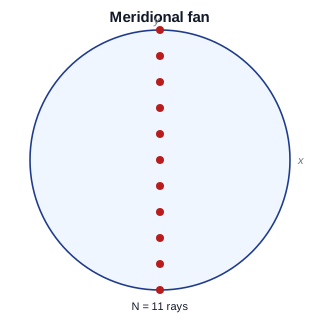
Equally spaced ray heights along the active slice axis (Y shown).
Cross fan
Two orthogonal linear fans superimposed: one along X and one along Y.
Generated by calling __patern_rect twice — once with kx=1, ky=0 and
once with kx=0, ky=1 — and concatenating. UI label maps to
Pup.Ptype = "fan".
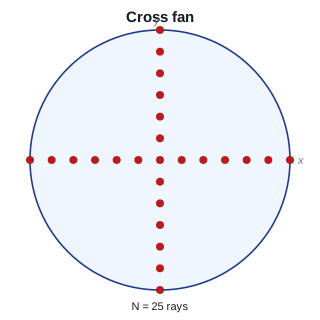
Union of the Fan X and Fan Y diameters. Useful for inspecting tangential and sagittal aberrations in a single pass.
Fan X
A single linear fan along the X (sagittal) diameter of the pupil:
\(\{(i/\mathrm{Samp},\, 0)\,:\, i = -\mathrm{Samp},\dots,\mathrm{Samp}\}\).
The points outside the unit disk are dropped, which here collapses to the
diameter only because y = 0. UI label maps to Pup.Ptype = "fanx".
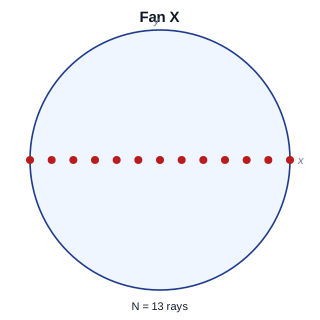
Sagittal ray fan; the right choice when only X-axis pupil dependence matters (e.g., transverse spherical / sagittal coma traces).
Fan Y
A single linear fan along the Y (tangential / meridional) diameter:
\(\{(0,\, j/\mathrm{Samp})\,:\, j = -\mathrm{Samp},\dots,\mathrm{Samp}\}\).
UI label maps to Pup.Ptype = "fany".
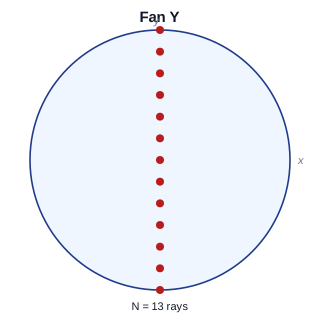
Tangential ray fan; the canonical input for meridional aberration plots.
Hexapolar
The classical hex-polar grid: one chief ray at the centre plus Samp
concentric rings, with ring j containing 6·j points evenly spaced in
azimuth. Total ray count is \(1 + 6\,\frac{\mathrm{Samp}(\mathrm{Samp}+1)}{2}
= 1 + 3\,\mathrm{Samp}(\mathrm{Samp}+1)\). UI label maps to
Pup.Ptype = "hexapolar".
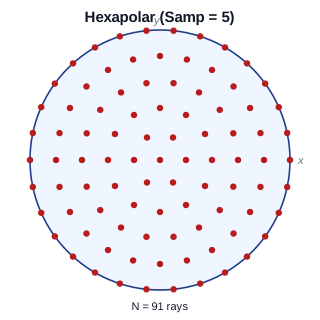
Roughly uniform area density across the pupil while remaining deterministic and reproducible. The default pattern for full-pupil analysis and most aberration / spot-diagram work in KrakenOS.
Square
A Cartesian grid of step \(1/\mathrm{Samp}\) covering the bounding
square \([-1, 1]^2\), clipped to the unit disk. UI label maps to
Pup.Ptype = "square".
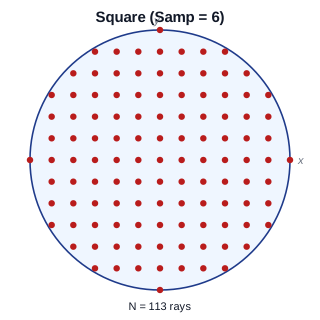
Easy to align with detector pixels and convenient for FFT-based wavefront / OPD reductions where a square footprint is expected.
Random disk
Uniform pseudo-random sampling over the unit disk. The implementation draws
4·Samp² candidate \((x, y)\) pairs uniformly in \([-1, 1]^2\) and
keeps only those with \(x^2 + y^2 < 1\). UI label maps to
Pup.Ptype = "rand".
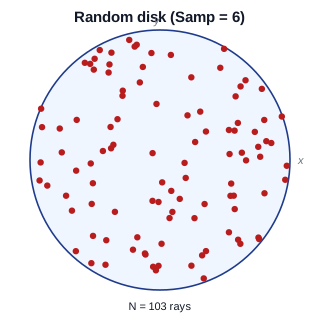
Useful for Monte-Carlo style throughput, energy-encircled, and PSF estimates where a deterministic grid would alias.
Chief ray
A single ray at the centre of the pupil — the chief ray for the current
field point. Useful as a sanity check, for distortion measurements, or for
locating the centroid before launching a denser pattern. UI label maps to
Pup.Ptype = "chief".
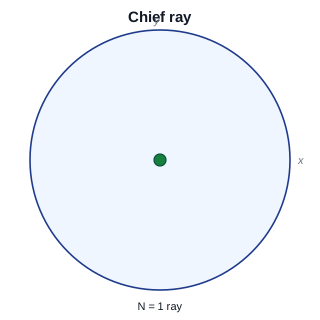
One ray; pupil radius and field still define its origin and direction
cosines through Pattern2Field.
R-theta
A single ray placed at polar coordinates (Pup.rad, Pup.theta) on the
unit pupil:
with Pup.rad in \([0, 1]\) and Pup.theta in degrees in
\([0, 360)\). When this pattern is selected, the Layout Editor exposes
the rad and theta fields (see the conditional in
layout_editor.py near
self._current_pupil_pattern_label() == "R-theta"). UI label maps to
Pup.Ptype = "rtheta".
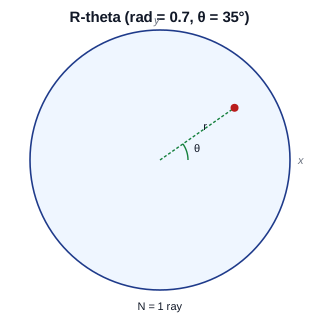
A targeted probe ray. Sweep Pup.theta to walk around the pupil at
fixed radius, or sweep Pup.rad to walk a single azimuth from chief
ray to marginal ray.
Summary
UI label |
|
Notes |
|---|---|---|
Meridional fan |
(preview only) |
Default 2D section pattern; Open 3D source-cone traces map it to a filled 3D angular pupil. |
Cross fan |
|
Fan X ∪ Fan Y. |
Fan X |
|
Sagittal diameter; 2D/analysis section pattern. |
Fan Y |
|
Meridional / tangential diameter; 2D/analysis section pattern. |
Hexapolar |
|
Default for full-pupil analysis; |
Square |
|
Cartesian grid clipped to unit disk. |
Random disk |
|
Pseudo-random uniform on the disk; up to |
Chief ray |
|
Single ray at pupil centre. |
R-theta |
|
Single ray at polar |